







Question: Assume we want to change the Stop-and-Wait protocol and add the NAK (negative ACK) packet to the system. When a corrupted packet arrives at the
Assume we want to change the Stop-and-Wait protocol and add the NAK (negative ACK) packet to the system. When a corrupted packet arrives at the receiver, the receiver discards the packet, but sends a NAK with a nakNo defining the seqNo of the corrupted packet. In this way, the sender can resend the corrupted packet without waiting for the time-out. Explain what changes need to be made in the FSM of Figure 23.21 and show an example of the operation of the new protocol with a time-line diagram.
Figure 23.21
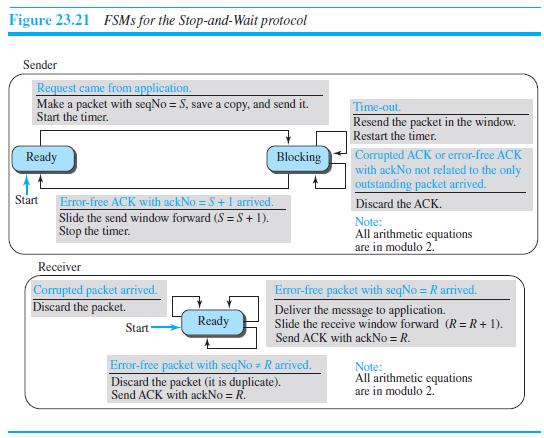
Figure 23.21 FSMS for the Stop-and-Wait protocol Sender Request came from application. Make a packet with seqNo = S, save a copy, and send it. Start the timer. Time-out. Resend the packet in the window. Restart the timer. Corrupted ACK or error-free ACK with ackNo not related to the only outstanding packet arived. Ready Blocking Start Error-free ACK with ackNo = $ +1 arrived. Slide the send window forward (S = S+1). Stop the timer. Discard the ACK. Note: All arithmetic equations are in modulo 2." Receiver Corrupted packet arrived. Discard the packet. Error-free packet with seqNo = R arrived. Deliver the message to application. Slide the receive window forward (R= R + 1). Send ACK with ackNo = R. Ready Start Error-free packet with seqNo = Rarrived. Discard the packet (it is duplicate). Send ACK with ackNo = R. Note: All arithmetic equations are in modulo 2.
Step by Step Solution
3.43 Rating (162 Votes )
There are 3 Steps involved in it
In the receivers FSM we change the event when a corrupted pac... View full answer

Get step-by-step solutions from verified subject matter experts
 Study Help