







Question: Use only the first five rows of data listed in Data Set 13 in Appendix B. Complete the following tasks in Excel. a. Create the
Use only the first five rows of data listed in Data Set 13 in Appendix B.
Complete the following tasks in Excel.
a. Create the described worksheet.
b. Save the worksheet.
c. Print a copy of the worksheet.
d. Close the worksheet.
e. Open the worksheet.
f. Using the mouse, click the cell in the top left corner of the worksheet, then hold the mouse button and slide the mouse to the right and down so that the top half of the table is highlighted. Release the mouse button, then press the Delete key. Describe what happens to the worksheet. Now click the Undo arrow in the Ribbon and describe what happens.
Data set 13
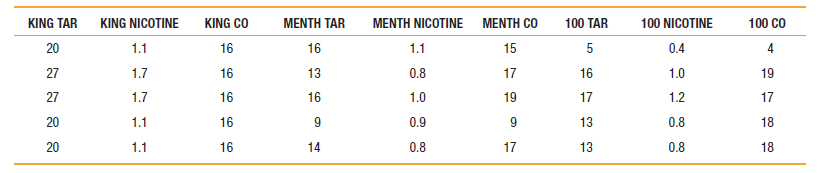
MENTH TAR 16 13 MENTH NICOTINE KING NICOTINE KING CO 16 MENTH CO 15 17 100 NICOTINE 0.4 100 TAR KING TAR 20 100 CO 5 1.1 1.7 1.1 0.8 1.0 4 19 27 16 1.0 16 27 1.7 19 1.2 16 17 17 16 20 0.9 1.1 9. 13 0.8 18 16 20 14 17 0.8 1.1 0.8 13 18 16
Step by Step Solution
3.51 Rating (161 Votes )
There are 3 Steps involved in it
f The top h... View full answer

Get step-by-step solutions from verified subject matter experts
 Study Help