







Question: When using histograms to compare two data sets, it is sometimes difficult to make comparisons by looking back and forth between the two histograms. A
When using histograms to compare two data sets, it is sometimes difficult to make comparisons by looking back and forth between the two histograms. A back-to-back relative frequency histogram uses a format that makes the comparison much easier. Instead of frequencies, we should use relative frequencies (percentages or proportions) so that the comparisons are not distorted by different sample sizes. Complete the back-to-back relative frequency histograms shown below by using the data from Table 2-8 on page 51. Then use the result to compare the two data sets.
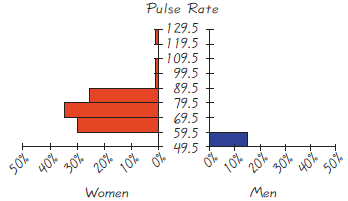
Pulse Rate 1 29.5 F119.5 109.5 99.5 89.5 79.5 69.5 59.5 40% 10% 0% Women 49.5 0% 20% 30% 40% Men Z01 ZOZ ZOS ZOS ZOs
Step by Step Solution
3.49 Rating (175 Votes )
There are 3 Steps involved in it
To compare two data sets using backtoback relative frequency histograms you need to create h... View full answer

Get step-by-step solutions from verified subject matter experts
 Study Help