







Question: Rewrite the subroutine in the previous exercise so that the user interface is as demonstrated in the following screen shots. Some of the functions needed
Rewrite the subroutine in the previous exercise so that the user interface is as demonstrated in the following screen shots. Some of the functions needed to write the subroutine were not covered in the text. We used the following functions:
? Val ?A function used to convert a string of digits to a number.
? Left ?A function used to return the left part of a string.
? Right ?A function used to return the right part of a string.
? FormatPercent ?A function used to format a number.
? FormatCurrency ?A function used to format a number.
More information about these functions is available from the VBA Help file. We recommend you use it.
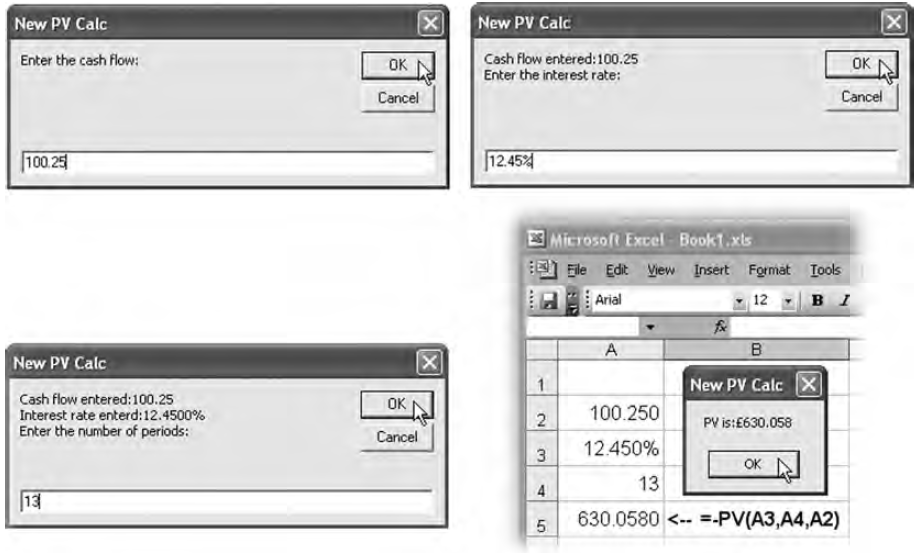
New PV Calc New PV Calc Cash flow entred:100.25 Enter the interest rate: Enter the cash flow: OK OK Cancel Cancel 100.25 12.454 Microsoft Excel Book1.xls Ele Edit View Insert Format Tools Arial 12 B I A New PV Calc New PV Calc X Cash flow entered:100.25 Interest rate enterd:12.4500% Enter the number of periods: OK 100.250 PV is:E630.058 Cancel 12.450% 3 OK D 13 4 13 630.0580
Step by Step Solution
3.35 Rating (155 Votes )
There are 3 Steps involved in it
Sub PVCalculator Dim cashFlow As Double Dim interestRate As Double Dim numPeriods As Integer Dim pre... View full answer

Get step-by-step solutions from verified subject matter experts
 Study Help