







Question: Huffman coding animation) Write a program that enables the user to enter text and displays the Huffman coding tree based on the text, as shown
Huffman coding animation) Write a program that enables the user to enter text and displays the Huffman coding tree based on the text, as shown in Figure 25.23a. Display the weight of the subtree inside the subtree’s root circle. Display each leaf node’s character. Display the encoded bits for the text in a label. When the user clicks the Decode Text button, a bit string is decoded into text displayed in the label, as shown in Figure 25.23b.
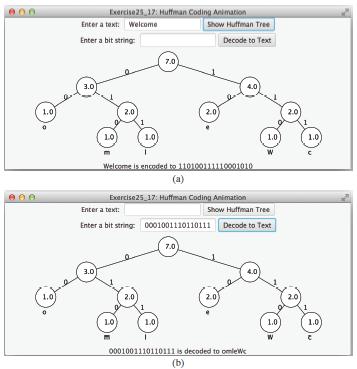
Exercise25. 17: Hutfman Coding Animation Show Hutfman Tree Enter a text: Welcome Enter a bit string Decode to Text 7.0) 3.0 1.0 2.0 2.0 2.0 10 1.0) 1.0 1.0) Welcome is encoded to 1101001110001010 (a) Exercise25 17: Huffman Coding Animation Enter a text: Show Huffman Tree Enter a bit string 0001001110110111 Decode to Text 10 3.0 4.0 2.0) 2.0 2.0) 1.0) 1.0) 1.0 0001001110110111 is decoded to omleWe (b)
Step by Step Solution
3.40 Rating (169 Votes )
There are 3 Steps involved in it
import javafxapplicationApplication import javafxgeometryPos import javafxstageStage import javafxsceneScene import javafxscenecontrolButton import javafxscenecontrolLabel import javafxscenecontrolTex... View full answer

Get step-by-step solutions from verified subject matter experts
 Study Help