







Question: Scatterplots, Correlation, and the Regression Line The data from Example 2.15 give the front and rear leg rooms (in centimetres) for nine different sport utility
Scatterplots, Correlation, and the Regression Line The data from Example 2.15 give the front and rear leg rooms (in centimetres) for nine different sport utility vehicles, as shown in Table 3.7:8Scatterplots, Correlation, and the Regression Line The data from Example 2.15 give the front and rear leg rooms (in centimetres) for nine different sport utility vehicles, as shown in Table 3.7:
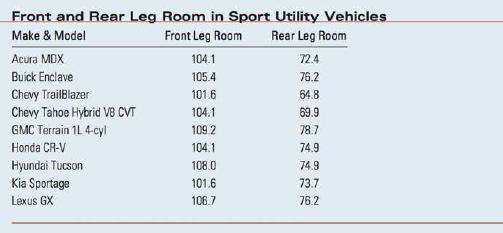
1. If you did not save the Excel spreadsheet from Chapter 2, enter the data into the first three columns of another Excel spreadsheet, using the labels in the table. Highlight the front and rear leg room data (columns B and C), click the Insert tab and select Scatter in the Charts group, and select the first option in the drop-down list. The scatterplot appears as in Figure 3.13(a), and will need to be edited!
2. Editing the scatterplot: With the scatterplot selected, look in the drop-down list in the Chart Layouts group. Find a layout that allows titles on both axes (we chose layout 1) and select it. Label the axes, remove the "legend entry" and retitle the chart as "Scatterplot of Front vs. Rear Leg Room." The scatterplot now appears in Figure 3.13(b). The plot is still not optimal, since Excel chooses to use zero as the lower limit of the vertical scale, causing the points to cluster at the top of the plot. To adjust this, double-click on the vertical axis. In the Format Axis dialogue box, change the Minimum to Fixed, type 63 in the box, and click Close. (You can make a similar adjustment to the horizontal axis if needed.) 3. To plot the best-fitting line, simply right-click on one of the data points and select Add Trendline. In the dialogue box that opens, make sure that the radio button marked "Linear" is selected, and check the boxes marked "Display Equation on Chart" and "Display R-squared value on Chart." The final scatterplot is shown in Figure 3.14.
Front and Rear Leg Room in Sport Utility Vehicles Make & Model Front Leg Room Rear Leg Room Acura MDX 104.1 72.4 Buick Enclave 105.4 76.2 Chevy TrailBlazer 101.6 64.8 Chevy Tahoe Hybrid VB CVT 104.1 69.9 GMC Terrain 1L 4-cyl 109.2 78.7 Honda CR-V 104.1 74.9 Hyundai Tucson Kia Sportage Lexus GX 108.0 74.9 101.6 73.7 106.7 76.2
Step by Step Solution
There are 3 Steps involved in it

Get step-by-step solutions from verified subject matter experts
 Study Help