







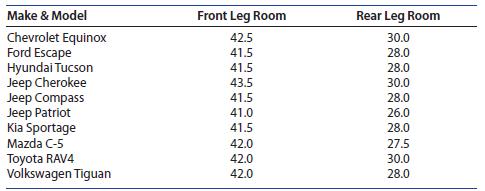
Question: (Scatterplots, Correlation, and the Regression Line) The data from Example 2.17 give the front and rear leg rooms (in inches) for 10 different compact sports
(Scatterplots, Correlation, and the Regression Line) The data from Example 2.17 give the front and rear leg rooms (in inches) for 10 different compact sports utility vehicles
1. If you did not save the Excel spreadsheet from Chapter 2, enter the data into the first three columns of another Excel spreadsheet, using the labels in the table. Highlight the front and rear leg room data (columns B and C), click the Insert tab, select the Scatter icon in the Charts group, and select the first option in the drop-down list. The scatterplot appears as in Figure 3.13(a), and will need to be edited!
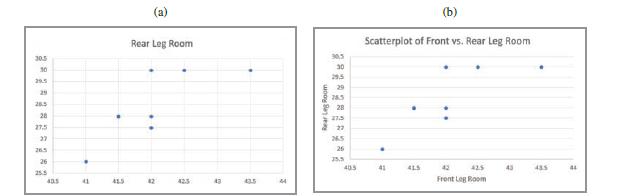
2. Editing the scatterplot: With the scatterplot selected, click on “Quick Layout” in the Chart Layouts group. Find a layout that allows titles on both axes (we chose layout 1)
and select it. Label the axes, remove the “legend entry” and retitle the chart as “Scatterplot of Front vs. Rear Leg Room.” The scatterplot now appears in Figure 3.13(b).
3. To plot the best-fitting line, simply right-click on one of the data points and select Add Trendline. In the Format menu that opens, make sure that the radio button marked “Linear”
is selected, and check the boxes marked “Display Equation on Chart” and “Display R-squared value on Chart.” The final scatterplot is shown in Figure 3.14.
Make & Model Front Leg Room Rear Leg Room Chevrolet Equinox 42.5 30.0 Ford Escape 41.5 28.0 Hyundai Tucson 41.5 28.0 Jeep Cherokee 43.5 30.0 Jeep Compass Jeep Patriot Kia Sportage 41.5 28.0 41.0 26.0 41.5 28.0 Mazda C-5 42.0 27.5 Toyota RAV4 42.0 30.0 Volkswagen Tiguan 42.0 28.0
Step by Step Solution
There are 3 Steps involved in it

Get step-by-step solutions from verified subject matter experts
 Study Help