







Question: Assume you have this program: a) Modify the above code to produce this output: b) Modify the above code to produce this output: For both
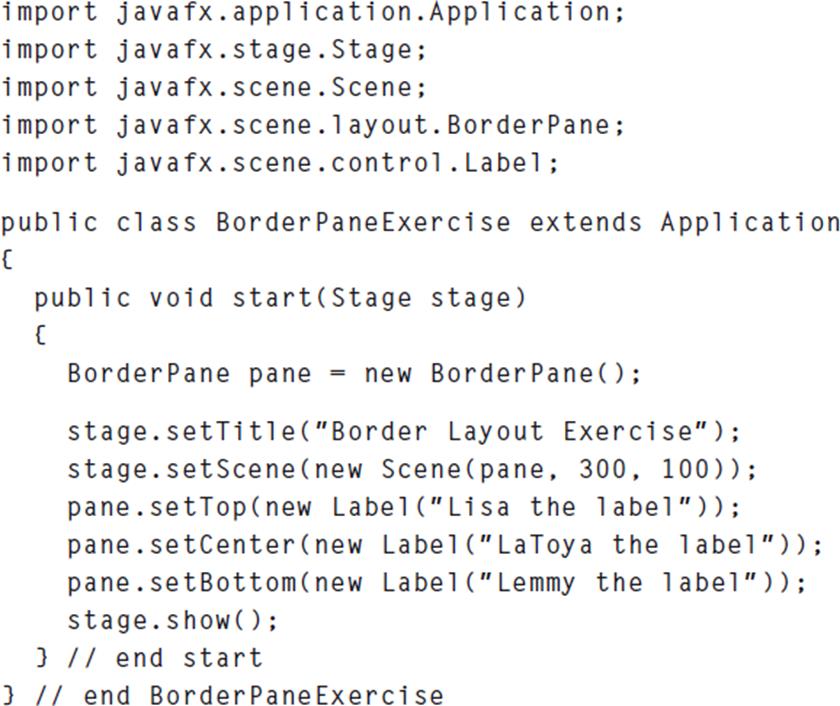
Assume you have this program:
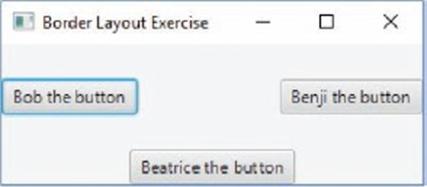
a) Modify the above code to produce this output:
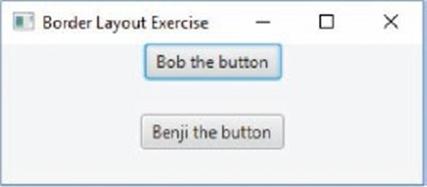
b) Modify the above code to produce this output:
For both
(a) and (b), call setAlignment(component, Pos.CENTER).
import javafx.application. Application; import javafx.stage. Stage; import javafx.scene.Scene; import javafx.scene. layout. Border Pane; import javafx.scene.control. Label; public class Border Pane Exercise extends Application { public void start (Stage stage) { Border Pane pane = new Border Pane(); stage.setTitle("Border Layout Exercise"); stage.setScene (new Scene (pane, 300, 100)); pane.setTop(new Label("Lisa the label")); pane.setCenter (new Label("LaToya the label")); pane.setBottom (new Label("Lemmy the label")); stage.show(); } // end start } // end Border Pane Exercise
Step by Step Solution
3.42 Rating (158 Votes )
There are 3 Steps involved in it
From the images youve provided it appears that you are asking for modifications to a JavaFX program The original program uses a BorderPane layout and ... View full answer

Get step-by-step solutions from verified subject matter experts
 Study Help