







Question: Modify Listing 12.18 WebCrawler.java to search for the wordComputer Programming starting from the URL http://cs.armstrong.edu/liang . ?Your program terminates once the word is found. Display
Modify Listing 12.18 WebCrawler.java to search for the wordComputer Programming starting from the URL http://cs.armstrong.edu/liang. ?Your program terminates once the word is found. Display the URL for the page that contains the word.
Listing
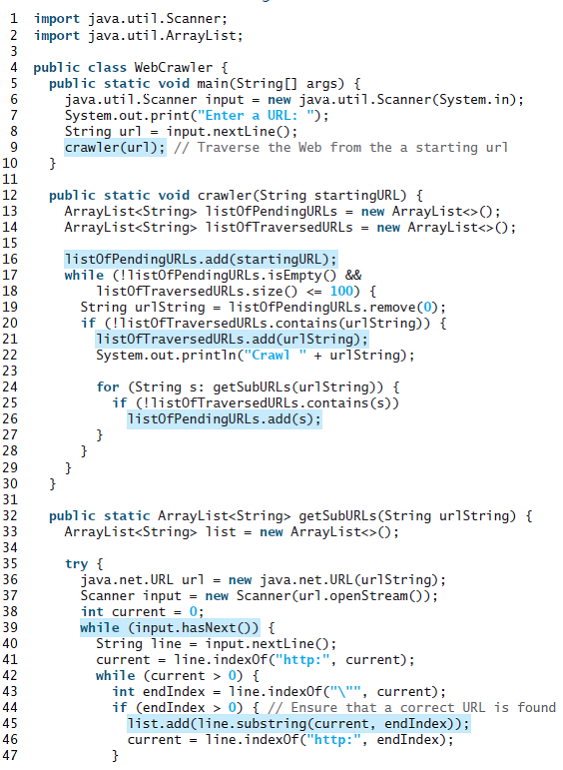
1 import java.util.Scanner; 2 import java.util.ArrayList; 3 4 public class WebCrawler { 5 public static void main(String[] args) { java.util.Scanner input = new java.util.Scanner(System.in); System.out.print("Enter a URL: "); String url = input.nextline(); crawler(url); / Traverse the Web from the a starting url 10 11 12 public static void crawler(String startingURL) { ArrayList list0fPendingURLS = new ArrayList (); ArrayList list0fTraversedURLS = new ArrayList (); 13 14 15 list0fPendingURLs.add(startingURL); while (!list0fPendingURLs.isEmpty() && list0fTraversedURLs.size() 0) { int endIndex = line.indexOf C"\"", current); if (endIndex > 0) { // Ensure that a correct URL is found list.add(line.substring(current, endIndex)); current = line.indexOf("http:", endIndex); 36 37 38 39 40 41 42 43 44 45 46 47 222N 222 223 333 333 333 444 444 44
Step by Step Solution
3.45 Rating (158 Votes )
There are 3 Steps involved in it
Program Plan Create a class SearchWeb Declare searchWord startingURL of type Strings Implement the m... View full answer

Get step-by-step solutions from verified subject matter experts
 Study Help