







Question: Modify Listing 28.10, ConnectedCircles.java, to enable the user to drag and move a circle. Listing 1 import javafx.application. Application; 2 import javafx.geometry.Point2D; 3 import javafx.scene.Node;
Modify Listing 28.10, ConnectedCircles.java, to enable the user to drag and move a circle.
Listing
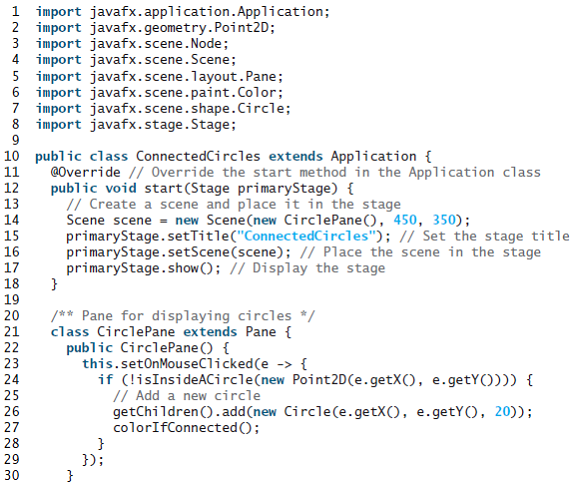
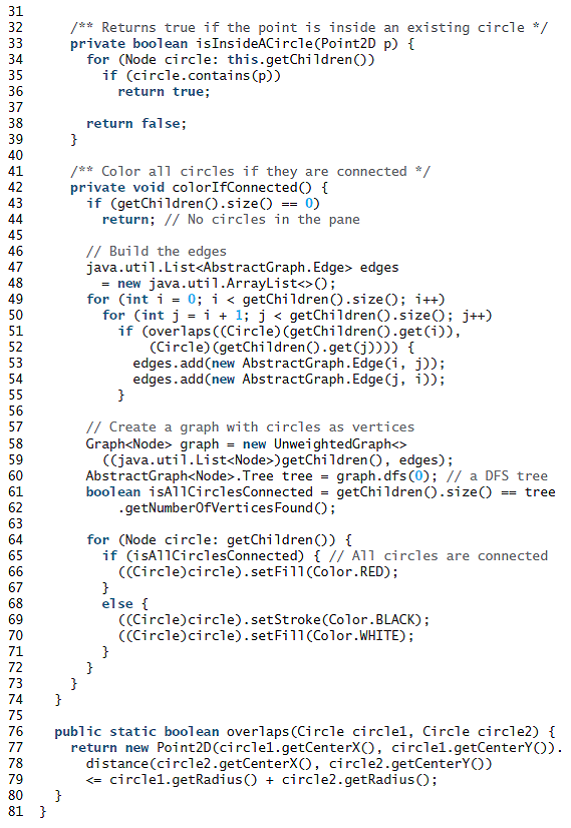
1 import javafx.application. Application; 2 import javafx.geometry.Point2D; 3 import javafx.scene.Node; 4 import javafx.scene.Scene; 5 import javafx.scene.layout.Pane; 6 import javafx.scene.paint.Color; 7 import javafx.scene.shape.Circle; 8 import javafx.stage.Stage; 10 public class ConnectedCircles extends Application { 11 12 13 14 15 16 17 18 19 @Override // Override the start method in the Application class public void start(Stage primaryStage) { // Create a scene and place it in the stage Scene scene = new Scene(new CirclePane(), 450, 350); primaryStage.setTitle("ConnectedCircles"); // Set the stage title primaryStage.setScene(scene); // Place the scene in the stage primaryStage.show(); // Display the stage /** Pane for displaying circles */ class CirclePane extends Pane { 20 21 public CirclePane () { this.setOnMouseClicked(e -> { if (!isInsideACircle(new Point2D(e.getX(), e.getY()))) { // Add a new circle getChildren ().add(new Circle(e.getX(), e.getY(), 20)); colorIfConnected(); 22 23 24 25 26 27 28 }); 29 30 /** Returns true if the point is inside an existing circle */ private boolean isInsideACircle(Point2D p) { for (Node circle: this.getChildren()) if (circle.contains (p)) 33 34 35 36 return true; 37 38 return false; 39 40 41 42 /** Color all circles if they are connected */ private void colorIfConnected() { if (getChildren().size() == 0) return; // No circles in the pane 43 44 45 46 47 48 49 50 51 52 53 54 55 56 57 // Build the edges java.util.List edges = new java.util.ArrayList (); for (int i = 0; i < getChildren().size(); i++) for (int j = i + 1; j < getChildren().size(); j++) if (overlaps ((Circie) (getChildren().get(i)), (Circle) (getChildren().get(j)))) { edges.add(new AbstractGraph.Edge (i, j)); edges.add(new AbstractGraph. Edge (j, i)); 58 59 60 61 62 63 // Create a graph with circles as vertices Graph graph = new UnweightedGraph ((java.util.List )getChildren(), edges); AbstractGraph .Tree tree = graph.dfs (0); // a DFS tree boolean isAl1CirclesConnected = getChildren ().size() == tree .getNumberofVerticesFound (); 64 for (Node circle: getChildren()) { if (isA11CirclesConnected) { // All circles are connected ((Circle)circle).setFill(Color.RED); 65 66 67 68 else { ((Circle)circle).setStroke(Color.BLACK); (Circle)circle).setFill(Color.WHITE); 69 70 71 72 73 74 { 75 public static boolean overlaps (Circle circlel, Circle circle2) { return new Point2D(circlel.getCenterX(), circlel.getCenterYO). distance(circle2.getCenterX(), circle2.getCenterY())
Step by Step Solution
3.45 Rating (158 Votes )
There are 3 Steps involved in it
To enable user to drag and move a circle the Pane must be set to listen that event It can be done by ... View full answer

Get step-by-step solutions from verified subject matter experts
 Study Help