







Question: Modify Listing, TestWeightedGraph.java, to create a file for representing graph1. The file format is described in Exercise. Create the file from the array defined in
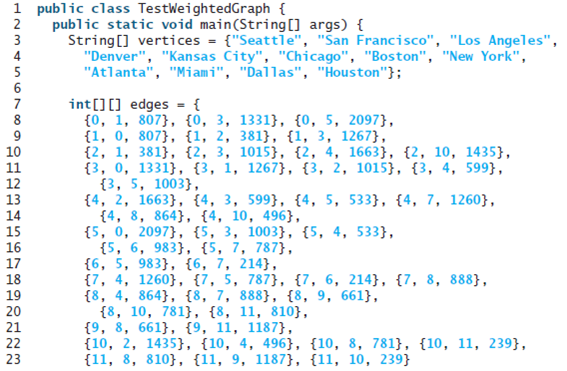
Modify Listing, TestWeightedGraph.java, to create a file for representing graph1. The file format is described in Exercise. Create the file from the array defined in lines 7?24 in Listing. The number of vertices for the graph is 12, which will be stored in the first line of the file. An edge (u, v) is stored if u. The contents of the file should be as follows:
Listing
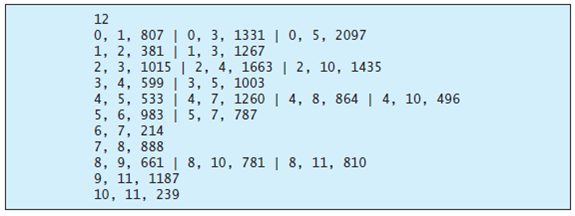
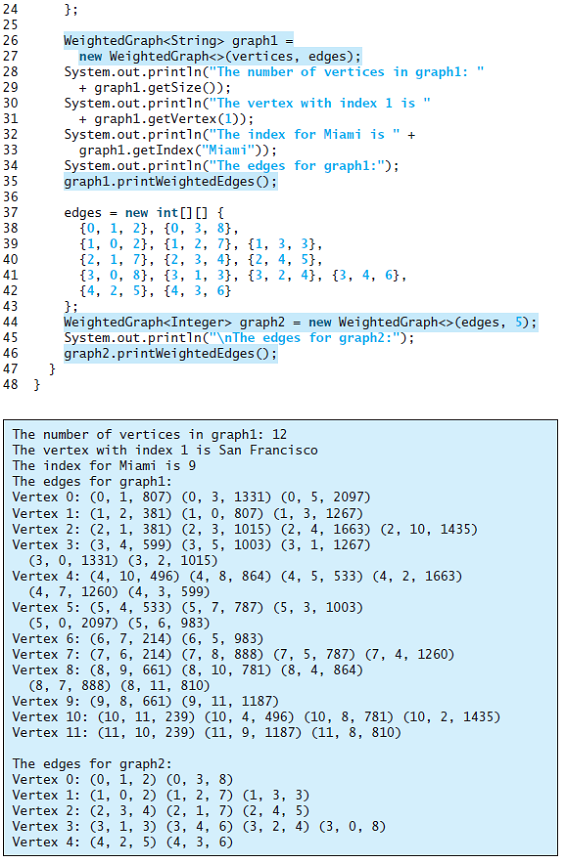
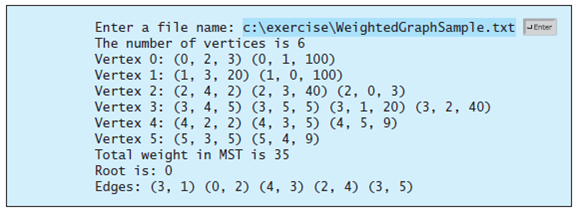
Write a program that reads a connected graph from a file and displays its minimum spanning tree. The first line in the file contains a number that indicates the number of vertices (n). The vertices are labeled as?0,?1, ...,?n-1. Each subsequent line describes the edges in the form of?u1, v1, w1 | u2, v2, w2 | .... Each triplet in this form describes an edge and its weight. Figure shows an example of the file for the corresponding graph. Note that we assume the graph is undirected. If the graph has an edge (u,?v), it also has an edge (v,?u). Only one edge is represented in the file. When you construct a graph, both edges need to be added. Your program should prompt the user to enter the name of the file, read data from the file, create an instance?g?of?WeightedGraph, invoke?g.printWeightedEdges()?to display all edges, invoke?getMinimumSpanningTree()?to obtain an instance?tree?of?WeightedGraph.MST, invoke?tree.getTotalWeight()?to display the weight of the minimum spanning tree, and invoke?tree.printTree()?to display the tree. Here is a sample run of the program:
12 0, 1, 807 | 0, 3, 1331 | 0, 5, 2097 2, 3, 1015 | 2, 4, 1663 | 2, 10, 1435 3, 4, 599 | 3, 5, 1003 4, 5, 533 | 4, 7, 1260 | 4, | 5, 7, 787 8, 864 | 4, 10, 496 5, 6, 983 6, 7, 214 7, 8, 888 8, 9, 661 | 8, 10, 781 | 8, 11, 810 9, 11, 1187 10, 11, 239 1 public class TestWeightedGraph { public static void main(String[] args) { String[] vertices = {"Seatte", "San Francisco", "Los Angeles", "Denver", "Kansas City", "Chicago", "Boston", "New York", "Atlanta", "Miami", "Dallas", "Houston"}; 3 4 int[][] edges {0, 1, 807}, {0, 3, 1331}, {0, 5, 2097}, {1, 0, 807}, {1, 2, 381}, {1, 3, 1267}, {2, 1, 381}, {2, 3, 1015}, {2, 4, 1663}, {2, 10, 1435}, {3, 0, 1331}, {3, 1, 1267}, {3, 2, 1015}, {3, 4, 599}, {3, 5, 1003}, {4, 2, 1663}, {4, 3, 599}, {4, 5, 533}, {4, 7, 1260}, {4, 8, 864}, {4, 10, 496}, {5, 0, 2097}, {5, 3, 1003}, {5, 4, 533}, {5, 6, 983}, {5, 7, 787}, {6, 5, 983}, {6, 7, 214}, {7, 4, 1260}, {7, 5, 787}, {7, 6, 214}, {7, 8, 888}, {8, 4, 864}, {8, 7, 888}, {8, 9, 661}, {8, 10, 781}, {8, 11, 810}, {9, 8, 661}, {9, 11, 1187}, {10, 2, 1435}, {10, 4, 496}, {10, 8, 781}, {10, 11, 239}, {11, 8, 810}, {11, 9, 1187}, {11, 10, 239} |10 11 |12 |13 |14 15 16 17 18 19 20 21 22 23
Step by Step Solution
3.49 Rating (156 Votes )
There are 3 Steps involved in it
To display the data that is written to the file on the screen the following changes need to be done on the program The output can be displayed on the ... View full answer

Get step-by-step solutions from verified subject matter experts
 Study Help