







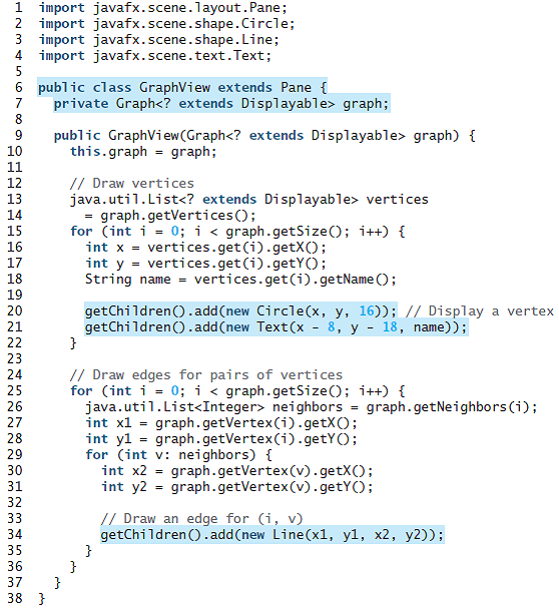
Question: Revise GraphView in Listing 28.6 to display a weighted graph. Write a program that displays the graph in Figure 29.1 as shown in Figure 29.25.
Revise GraphView in Listing 28.6 to display a weighted graph. Write a program that displays the graph in Figure 29.1 as shown in Figure 29.25. (Instructors may ask students to expand this program by adding new cities with appropriate edges into the graph).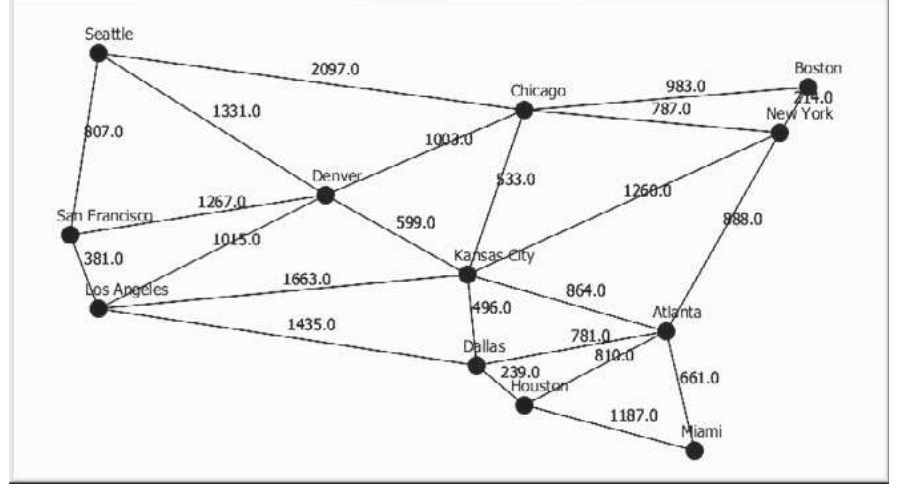
Listing
Scattle 2097.0 Boston .0 Ney York 983.0 787.0 Chicago 1331.0 $07.0 190a:0 Denver $33.0 1260.0 1267.0 San Francisco 988.0 599.0 1015.0 Kansas eity 381.0 1663.0 bos Apgcles 864.0 496.0 Atlanta 1435.0 781.0 810:0 Dallas 239.0 Houston 661.0 1187.0 Miami 1 import javafx.scene.layout.Pane; 2 import javafx.scene.shape.Circle; 3 import javafx.scene.shape.Line; 4 import javafx.scene.text.Text; 5 6 public class GraphView extends Pane { private Graph
Step by Step Solution
3.45 Rating (168 Votes )
There are 3 Steps involved in it
To display the weight the following modifications are made After getting the neighbors for the given ... View full answer

Get step-by-step solutions from verified subject matter experts
 Study Help