







Question: Revise GraphView in Listing 28.6 to display a weighted graph and a minimum spanning tree for the graph in Figure 29.1, as shown in Figure
Revise GraphView in Listing 28.6 to display a weighted graph and a minimum spanning tree for the graph in Figure 29.1, as shown in Figure 29.26. The edges in the MST are shown in red.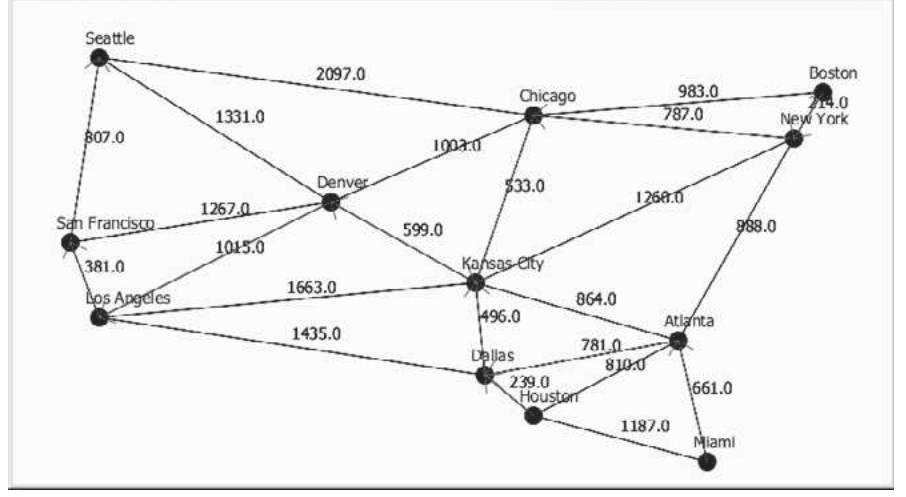
Listing
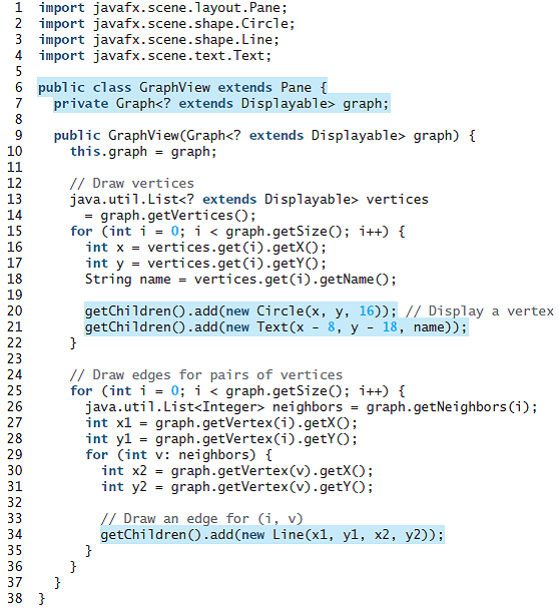
Seattle Boston 2097.0 983.0 787.0 Chicago 4.0 Neyw York 1331.0 807.0 100a.0 $33.0 Denver 1260.0 1267.0 San Francisco 988.0 599.0 1015.0 Kansas eity 381.0 1663.0 Los Apgcles 864.0 496.0 Atlanta 1435.0 781.0. 810.0 Dallas 239.0 Houstor 661.0 1187.0 Miami 1 import javafx.scene.layout.Pane; 2 import javafx.scene.shape.Circle; 3 import javafx.scene.shape.Line; 4 import javafx.scene.text.Text; 5 6 public class GraphView extends Pane { private Graph
Step by Step Solution
3.36 Rating (162 Votes )
There are 3 Steps involved in it
Display Minimum Spanning Tree Program Plan Create two interface classes called AbstractGraph and Graph that contains the common behavior of the classes for Graph and AbstractGraph Crete a class weight... View full answer

Get step-by-step solutions from verified subject matter experts
 Study Help