







Question: Revise Listing 7.9, Calculator.java, to accept an expression as a string in which the operands and operator are separated by zero or more spaces. For
Revise Listing 7.9, Calculator.java, to accept an expression as a string in which the operands and operator are separated by zero or more spaces. For example, 3+4 and 3 + 4 are acceptable expressions. Here is a sample run: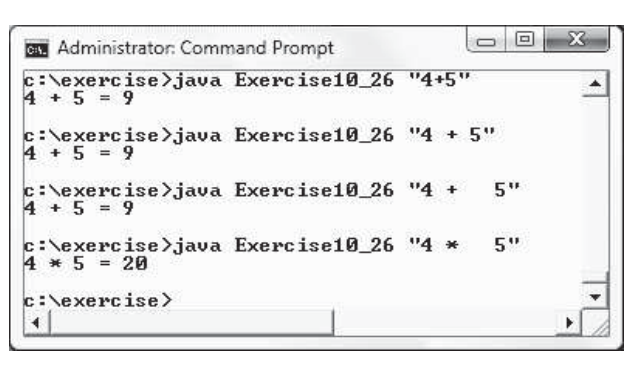 java Exercise10_26 "4 + 5" style="" class="fr-fic fr-dib">
Listing
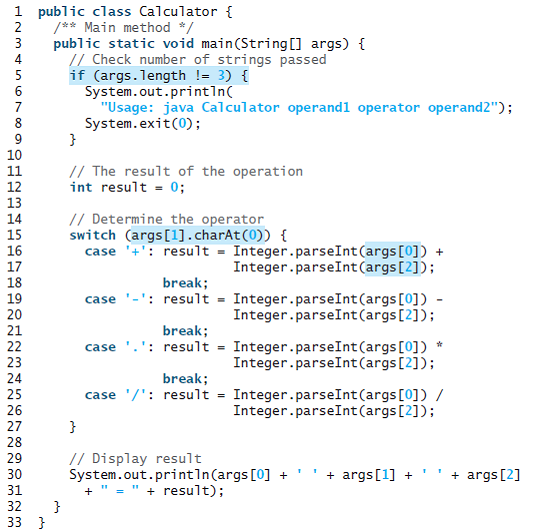
C. Administrator: Command Prompt c:\exercise>java Exercise10 26 "4+5" 4 + 5 = 9 c:\exercise>java Exercise10_26 "4 + 5" 4 + 5 = 9 c:\exercise>java Exercise10_26 "4 + 4 + 5 = 9 5" c:\exercise>java Exercise10_26 "4 * 4 * 5 = 20 c:\exercise> 1 public class Calculator { /** Main method */ public static void main(String [] args) { // Check number of strings passed if (args.length != 3) { System.out.println( "Usage: java Calculator operand1 operator operand2"); System.exit(0); 2 3 4. 8. 9. 10 // The result of the operation int result = 0; 11 12 13 14 15 16 17 18 19 20 21 // Determine the operator switch (args[1].charAt(0)) { case '+': result = Integer.parseInt(args[0]) + Integer.parseInt(args[2]); break; ': result = Integer.parseInt(args[0]) - case Integer.parseInt(args[2]); break; 22 case '.': result = Integer.parseInt(args[0]) * Integer.parseInt(args[2]); 23 24 break; case '/': result = Integer.parseInt(args[0]) / Integer.parseInt(args[2]); 25 26 27 28 // Display result System.out.println(args [0] + + result); 29 30 + args[1] + + args[2] 31 32 33 }
Step by Step Solution
3.34 Rating (157 Votes )
There are 3 Steps involved in it
Program Plan 1 Create a class Calculator 2 Declare and initialize the variable int result 0 calculat... View full answer

Get step-by-step solutions from verified subject matter experts
 Study Help