







Question: (a) Extend the code in Figure 14.5, 14.6, or 14.7 to try to kill processes more gently. Youll want to read the man page for
(a) Extend the code in Figure 14.5, 14.6, or 14.7 to try to kill processes more gently. You’ll want to read the man page for the standard kill command. Use a TERM signal first. If that doesn’t work, ask the user if you should resort to KILL.
(b) Extend your solution to part (a) so that the script accepts an optional argument specifying the signal to be used. Alternatives to TERM and KILL include HUP, INT, QUIT, and ABRT.
Figure 14.5:
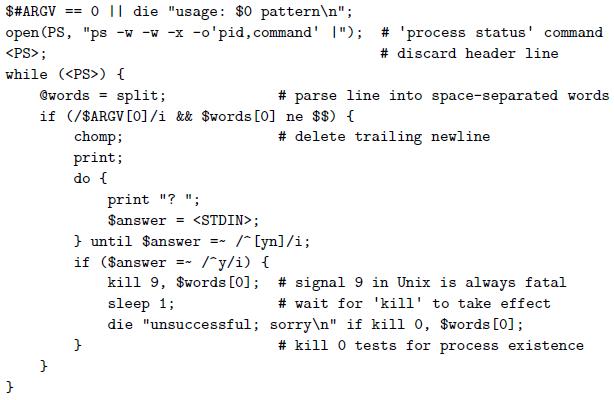
Figure 14.6:
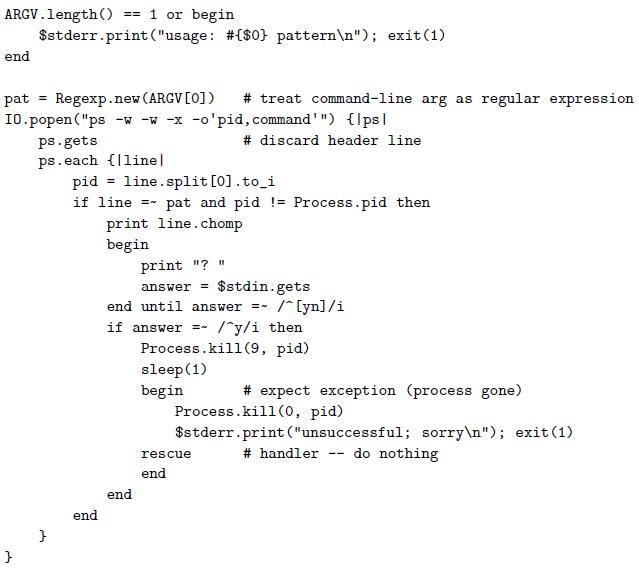
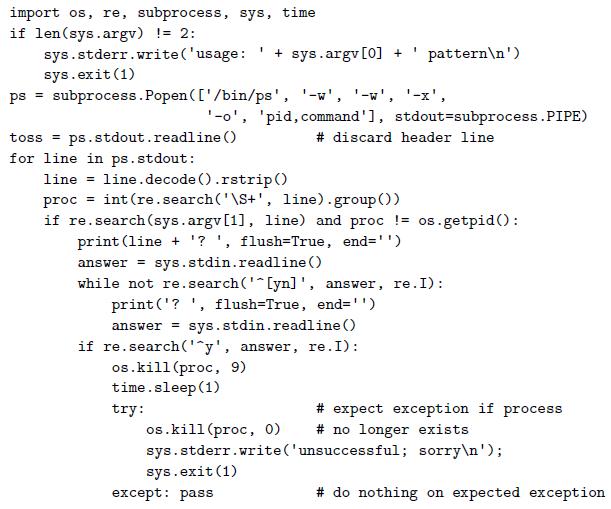 Figure 14.7:
O || die "usage: $0 pattern "; open (PS, "ps -w -w -x -o'pid,command' I"); $#ARGV == # 'process status' command ; # discard header line while ( ) { @words = split; # parse line into space-separated words if (/$ARGV [O1/i && $words [0] ne $$) { chomp; print; # delete trailing newline do { print "? "; $answer = ; } until $answer if ($answer kill 9, $words [0]; # signal 9 in Unix is always fatal sleep 1; die "unsuccessful; sorry " if kill 0, $words [0]; /* [yn]/i; /"y/i) { # wait for 'kill' to take effect # kill 0 tests for process existence
Step by Step Solution
3.37 Rating (166 Votes )
There are 3 Steps involved in it
answer a ARGV 0 die usage 0 pattern open PS ps wwx opid command 1 process status command discard header line while words split parse line into spacese... View full answer

Get step-by-step solutions from verified subject matter experts
 Study Help