







Question: What is the output of the code shown in Figure 8-95? Private Sub btnSuperHero_Click(ByVal sender As System.Object, ByVal e As System.EventArgs) Handles btnSuperHero. Click Dim
What is the output of the code shown in Figure 8-95?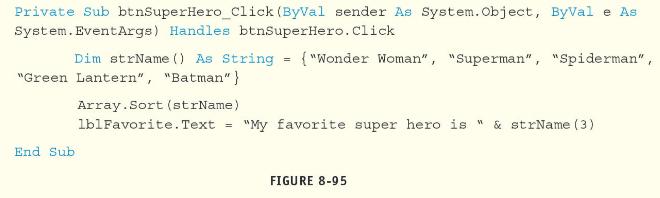
Private Sub btnSuperHero_Click(ByVal sender As System.Object, ByVal e As System.EventArgs) Handles btnSuperHero. Click Dim strName() As String = {"Wonder Woman", "Superman", "Spiderman", "Green Lantern", "Batman"} End Sub Array. Sort (strName) lbl Favorite.Text = "My favorite super hero is " & strName (3) FIGURE 8-95
Step by Step Solution
★★★★★
3.32 Rating (155 Votes )
There are 3 Steps involved in it
1 Expert Approved Answer
Step: 1 Unlock

Question Has Been Solved by an Expert!
Get step-by-step solutions from verified subject matter experts
Step: 2 Unlock
Step: 3 Unlock
 Study Help