







Question: Create an empty Web Site application named Dice. Save the application in the VB2015 Chap12 folder. Add a new Web page named Default.aspx to the
Create an empty Web Site application named Dice. Save the application in the VB2015\ Chap12 folder. Add a new Web page named Default.aspx to the application. Change the DOCUMENT object’s Title property to Dice Game. In Chapter 5’s Lesson C, you created the Roll ‘Em Game application. Review the application’s interface, pseudocode, and code, which are shown in Figures 5-64, 5-65, and 5-69, respectively. Create a similar application for the Web. The die images are contained in the VB2015\Chap12 folder.
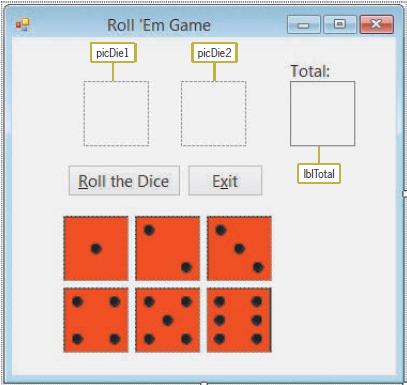
Figures 5-64
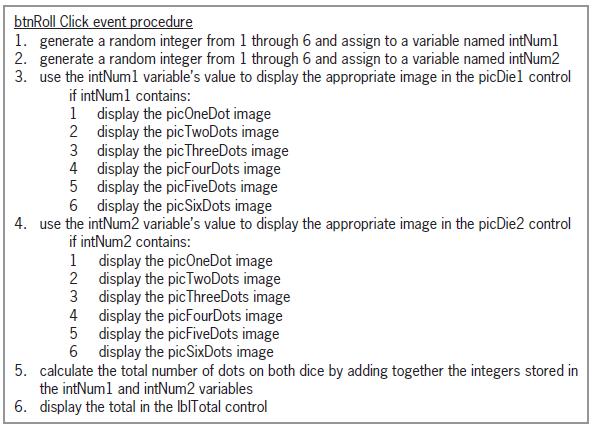
Figures 5-65
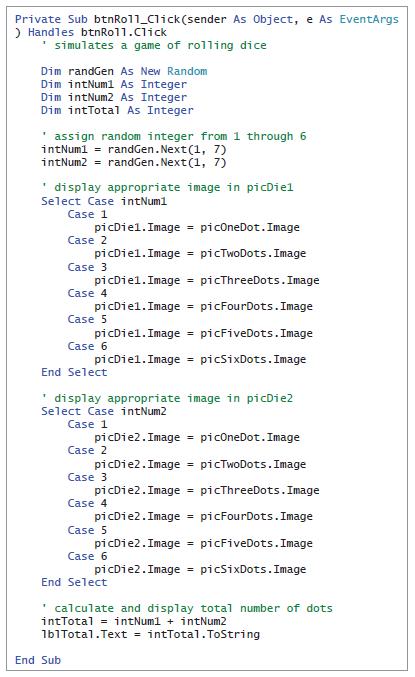
Figures 5-69
Roll 'Em Game picDiel picDie2 Total: IbITotal Roll the Dice Exit
Step by Step Solution
3.42 Rating (155 Votes )
There are 3 Steps involved in it
Dice Game autostyle1 textalign center autostyle2 width 36 height 236px autostyle3 autostyle7 width 3... View full answer

Get step-by-step solutions from verified subject matter experts
 Study Help