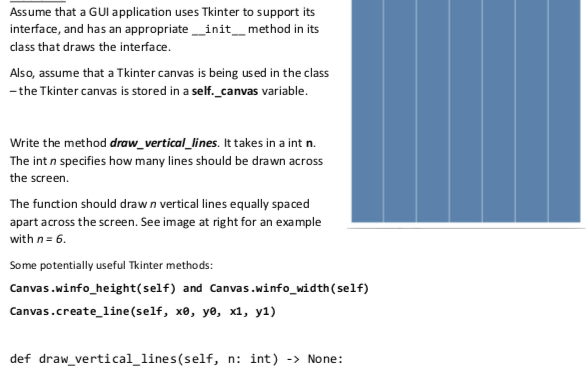
Question: 1. 2. The following program creates a simple Tkinter canvas on a window similar to what's shown at right, initialized by the color #000000 (Black)

1.
1. 2. The following program creates a simple Tkinter canvas on a

2.

window similar to what's shown at right, initialized by the color #000000

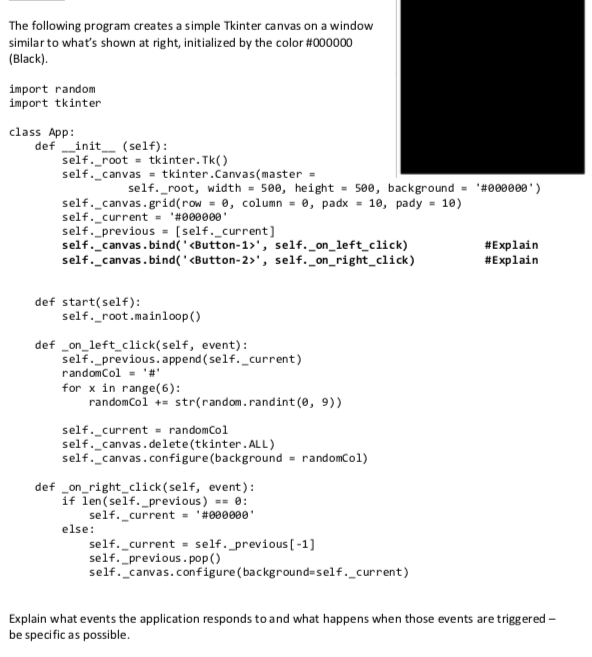
The following program creates a simple Tkinter canvas on a window similar to what's shown at right, initialized by the color #000000 (Black) import random import tkinter class App: def init (self): self._root tkinter.Tk() self.-canvas = tkinterCanvas(master = self.-root, height = see, background = 18) width = 5ee, .#eeeee.) self.-canvas . grid( row , column -e, padx 10, pady self. current#000000 self._previous[self._current] self._canvas.bind self._on_left click) self._canvas.bind , self._on_right_click) &Explain &Explain def start(self) self._root.mainloop() def on left click(self, event): self._previous.append (self._current) randomCol '4. for x in range(6): randomCol += str( random. randint(8, 9)) self._current randomCol self._canvas.delete(tkinter.ALL) self. _canvas. configure (background randomCol) def _onright_click (self, event): if len self._previous) selfcurrent - ,#eeeeee. - else: self-current = self .-previous [-1] self._previous. pop() self._canvas.configure (background-self._current) Explain what events the application responds toand what happens when those events are triggered be specific as possible

Step by Step Solution

There are 3 Steps involved in it

1 Expert Approved Answer
Step: 1 Unlock blur-text-image
Question Has Been Solved by an Expert!

Get step-by-step solutions from verified subject matter experts

Step: 2 Unlock
Step: 3 Unlock

Students Have Also Explored These Related Databases Questions!