







Question: 1. Add comments as appropriate. Be sure that your program output is neatly presented to the user. Add documentation comments to your functions. 2. Modify
1. Add comments as appropriate. Be sure that your program output is neatly presented to the user. Add documentation comments to your functions.
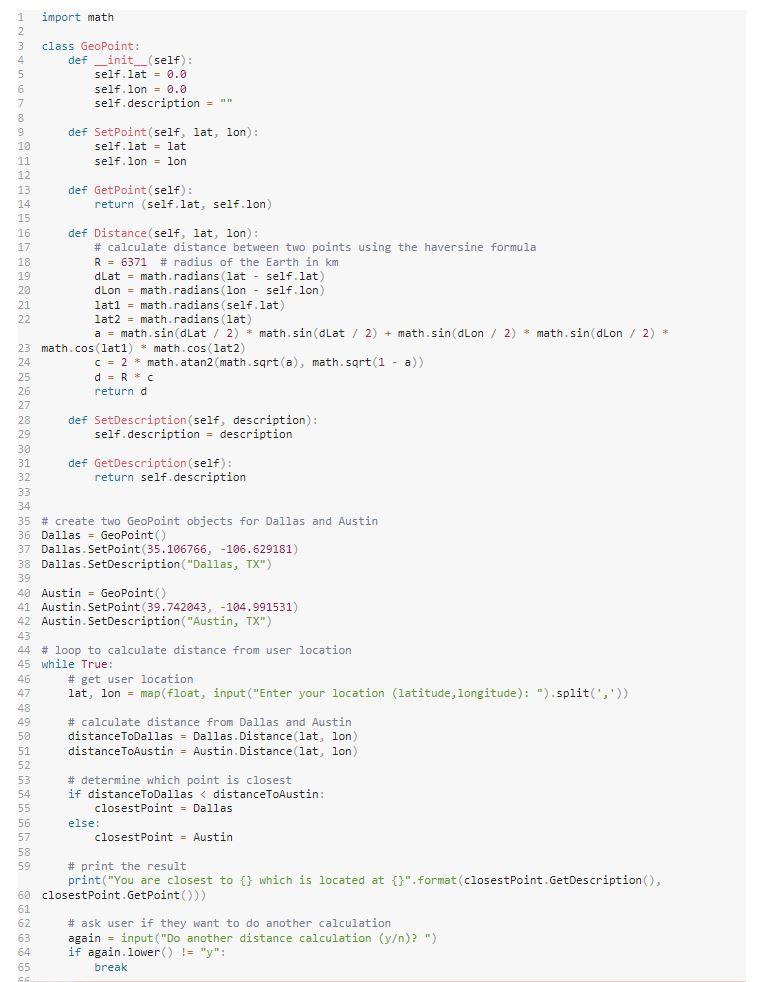
2. Modify your last GeoPoint program and add exception handling.
3. Wrap the code inside the main do another? loop of your last program with a try block.
4. Add three except blocks.
a. The first will catch a TypeError exception and display Wrong data type!
b. The second will catch an NameError and display a message that makes sense.
c. The third will catch a generic Exception along with its object e and display the message Something went wrong: , e so that the error message e is displayed.
Hints
The code will look something like this (yours may vary):
while True:
try
your code here
except TypeError :
print "Wrong data type!"
except NameError:
print your custom message
except Exception,e:
print "Something went wrong: ", e
doAnother = input('Do another (y)? ')
if doAnother = n:
break
The image below is the last GeoPoint program
Step by Step Solution
There are 3 Steps involved in it

Get step-by-step solutions from verified subject matter experts
 Study Help