







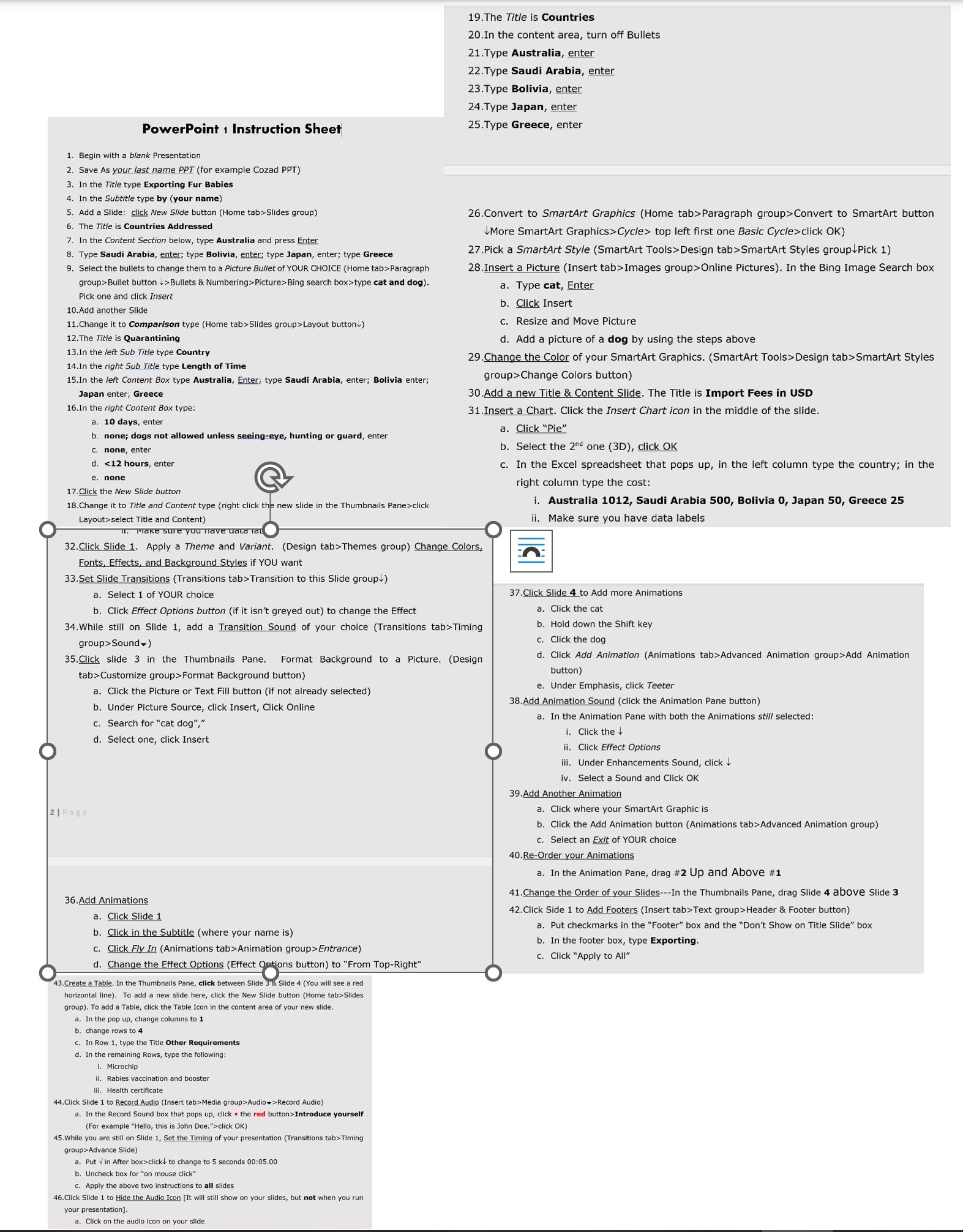
Question: 1 . Begin with a blank Presentation 2 . Save As your last name PPT ( for example Cozad PPT ) 3 . In the
Begin with a blank Presentation
Save As your last name PPT for example Cozad PPT
In the Title type Exporting Fur Babies
In the Subtitle type by your name
Add a Slide: click New Slide button Home tabSlides group
The Title is Countries Addressed
In the Content Section below, type Australia and press Enter
Type Saudi Arabia, enter; type Bolivia, enter; type Japan, enter; type Greece
Select the bullets to change them to a Picture Bullet of YOUR CHOICE Home tabParagraph groupBullet button Bullets & NumberingPictureBing search boxtype cat and dog Pick one and click Insert
Add another Slide
Change it to Comparison type Home tabSlides groupLayout button
The Title is Quarantining
In the left Sub Title type Country
In the right Sub Title type Length of Time
In the left Content Box type Australia, Enter; type Saudi Arabia, enter; Bolivia enter; Japan enter; Greece
In the right Content Box type:
a days, enter
b none; dogs not allowed unless seeingeye, hunting or guard, enter
c none, enter
d hours, enter
e none
Click the New Slide button
Change it to Title and Content type right click the new slide in the Thumbnails Paneclick Layoutselect Title and Content
The Title is Countries
In the content area, turn off Bullets
Type Australia, enter
Type Saudi Arabia, enter
Type Bolivia, enter
Type Japan, enter
Type Greece, enter
Step by Step Solution
There are 3 Steps involved in it
1 Expert Approved Answer
Step: 1 Unlock

Question Has Been Solved by an Expert!
Get step-by-step solutions from verified subject matter experts
Step: 2 Unlock
Step: 3 Unlock
 Study Help