







Question: 1 #!/bin/bash 2 count='ps ax -o user | grep -c $1' && [[ $count -ne o ]] && echo $1 has processes 2. You will
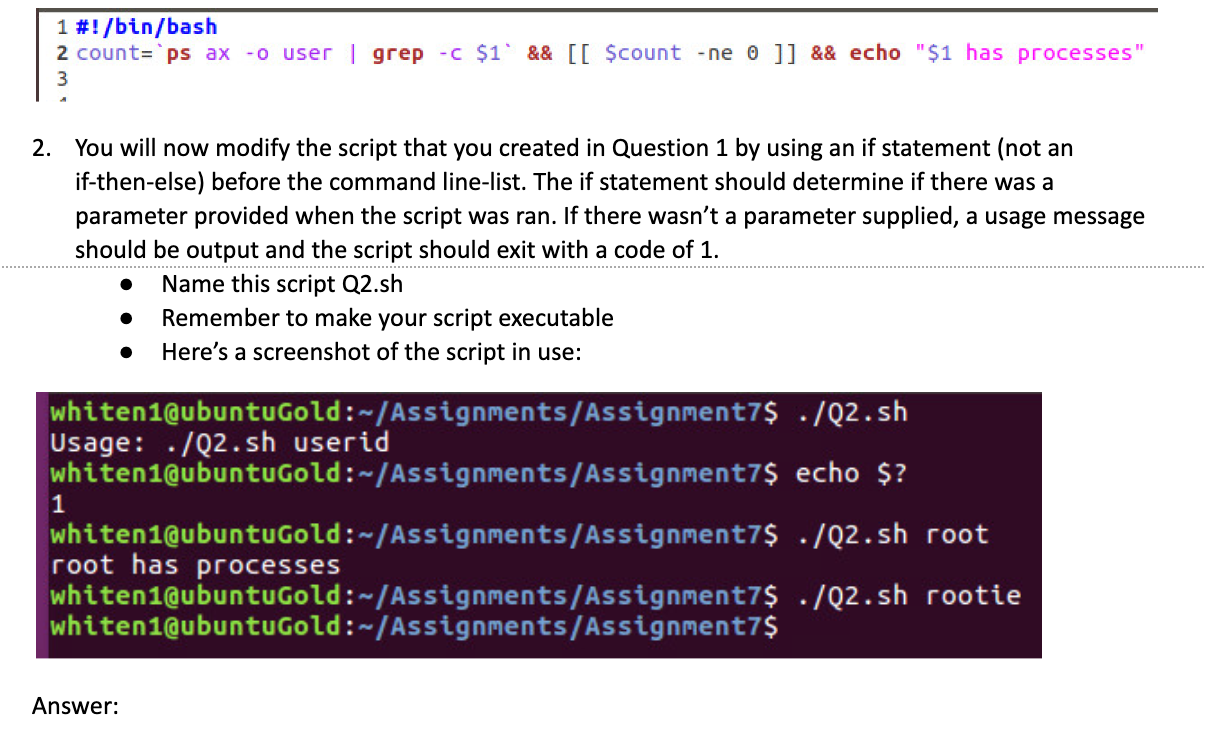
1 #!/bin/bash 2 count='ps ax -o user | grep -c $1' && [[ $count -ne o ]] && echo "$1 has processes" 2. You will now modify the script that you created in Question 1 by using an if statement (not an if-then-else) before the command line-list. The if statement should determine if there was a parameter provided when the script was ran. If there wasn't a parameter supplied, a usage message should be output and the script should exit with a code of 1. Name this script Q2.sh Remember to make your script executable Here's a screenshot of the script in use: whiten1@ubuntuGold :-/Assignments/Assignment7$ ./Q2.sh Usage: ./Q2.sh userid whiten1@ubuntuGold :-/Assignments/Assignment7$ echo $? whiten1@ubuntuGold:-/Assignments/Assignment7$ ./Q2.sh root root has processes whiten1@ubuntuGold: Assignments/Assignment7$ ./Q2.sh rootie whiten1@ubuntuGold:-/Assignments/Assignment7$
Step by Step Solution
There are 3 Steps involved in it

Get step-by-step solutions from verified subject matter experts
 Study Help