







Question: 1. click on 2. click on settings > click on General -confirmation 3. click on settings->click on Quizzes confirmation 4. click on preview->click on Quizzes
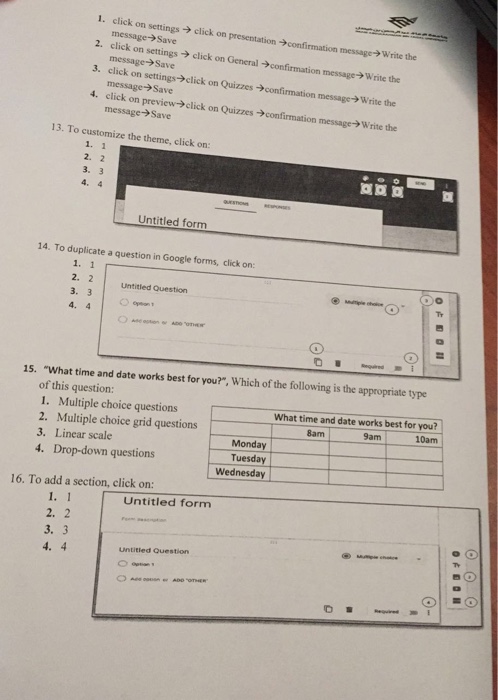
1. click on 2. click on settings > click on General -confirmation 3. click on settings->click on Quizzes confirmation 4. click on preview->click on Quizzes confirmation message->Write the ation confirmation message>Write the message-> Save message->Save message- Save message>Save message? write the 13. To customize the theme, click on: 1. 1 2. 2 3. 3 4. 4 Untitled form 14. To duplicate a question in Google forms, click on: 1. 1 2. 2 3. 3 4. 4 Untitled Question Tr 15. "What time and date works best for you?", Which of the following is the appropriate type of this question: 1. Multiple choice questions 2. Multiple choice grid questions 3. Linear scale 4. Drop-down questions What time and date works best for you? 10am 8am 9am Monday Tuesday Wednesday 16. To add a section, click on: Untitled form 1. 1 2. 2 3. 3 Untitied
Step by Step Solution
There are 3 Steps involved in it

Get step-by-step solutions from verified subject matter experts
 Study Help