



Question: 1. Configure PC's with IP address, subnet mask and default gateway. 2. Basic router and switch configurations. (hostname, privileged exec password, console and VTY
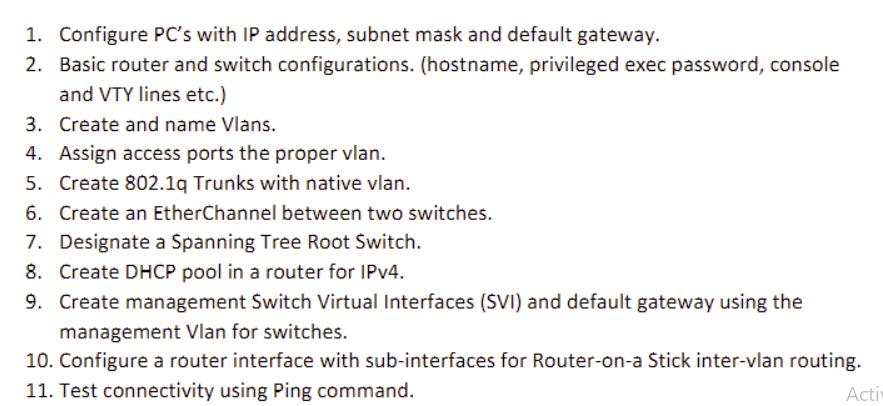
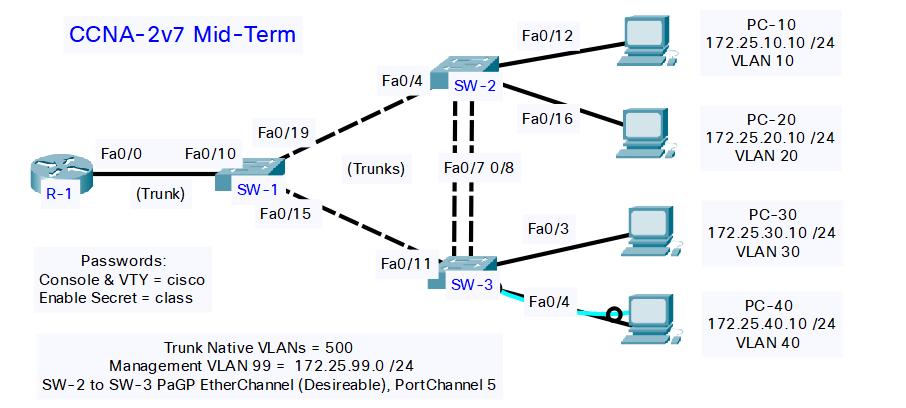
1. Configure PC's with IP address, subnet mask and default gateway. 2. Basic router and switch configurations. (hostname, privileged exec password, console and VTY lines etc.) 3. Create and name Vlans. 4. Assign access ports the proper vlan. 5. Create 802.1q Trunks with native vlan. 6. Create an EtherChannel between two switches. 7. Designate a Spanning Tree Root Switch. 8. Create DHCP pool in a router for IPv4. 9. Create management Switch Virtual Interfaces (SVI) and default gateway using the management Vlan for switches. 10. Configure a router interface with sub-interfaces for Router-on-a Stick inter-vlan routing. 11. Test connectivity using Ping command. Acti CCNA-2v7 Mid-Term R-1 Fa0/0 Fa0/10 (Trunk) Passwords: Console & VTY = cisco Enable Secret = class Fa0/19 SW-1 Fa0/15 Fa0/4 SW-2 (Trunks) Fa0/11 Fa0/7 0/8 SW-3 Trunk Native VLANs = 500 Management VLAN 99 = 172.25.99.0 /24 SW-2 to SW-3 PaGP EtherChannel (Desireable), Port Channel 5 Fa0/12 Fa0/16 Fa0/3 Fa0/4 PC-10 172.25.10.10 /24 VLAN 10 PC-20 172.25.20.10/24 VLAN 20 PC-30 172.25.30.10/24 VLAN 30 PC-40 172.25.40.10 /24 VLAN 40
Step by Step Solution
3.38 Rating (151 Votes )
There are 3 Steps involved in it
It appears that youre given a task list for configuring a set of network devices and PCs and then a network diagram to show the desired outcome To suc... View full answer

Get step-by-step solutions from verified subject matter experts