





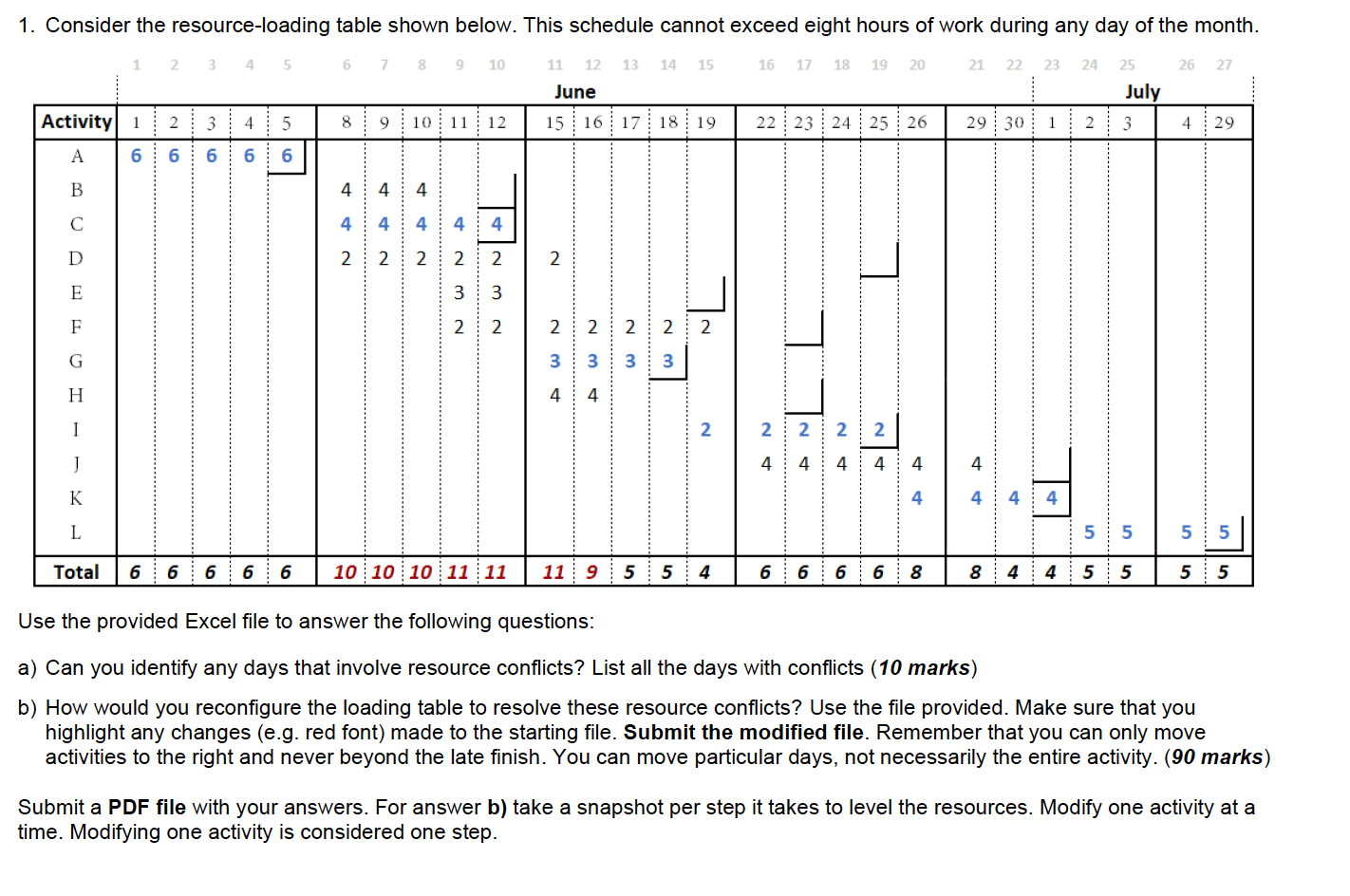
Question: 1. Consider the resource-loading table shown below. This schedule cannot exceed eight hours of work during any day of the month. 1 2 3 4
1. Consider the resource-loading table shown

1. Consider the resource-loading table shown below. This schedule cannot exceed eight hours of work during any day of the month. 1 2 3 4 5 6 7 8 9 10 13 14 15 16 17 18 19 20 21 22 23 24 26 27 11 12 June 15 16 25 July 3 8 9 10 11 12 17 18 19 22 23 24 25 26 29 30 1 2 4 29 Activity 1 2 3 4 5 166666 2212 WN NM + 22 4 4 4 4 4 4 4 | 55 | 551 Total 6 6 6 6 6 10 10 10 11 11 11 9 5 5 4 6 6 6 6 8 8 4 4 5 5 5 5 Use the provided Excel file to answer the following questions: a) Can you identify any days that involve resource conflicts? List all the days with conflicts (10 marks) b) How would you reconfigure the loading table to resolve these resource conflicts? Use the file provided. Make sure that you highlight any changes (e.g. red font) made to the starting file. Submit the modified file. Remember that you can only move activities to the right and never beyond the late finish. You can move particular days, not necessarily the entire activity. (90 marks) Submit a PDF file with your answers. For answer b) take a snapshot per step it takes to level the resources. Modify one activity at a time. Modifying one activity is considered one step. 1. Consider the resource-loading table shown below. This schedule cannot exceed eight hours of work during any day of the month. 1 2 3 4 5 6 7 8 9 10 13 14 15 16 17 18 19 20 21 22 23 24 26 27 11 12 June 15 16 25 July 3 8 9 10 11 12 17 18 19 22 23 24 25 26 29 30 1 2 4 29 Activity 1 2 3 4 5 166666 2212 WN NM + 22 4 4 4 4 4 4 4 | 55 | 551 Total 6 6 6 6 6 10 10 10 11 11 11 9 5 5 4 6 6 6 6 8 8 4 4 5 5 5 5 Use the provided Excel file to answer the following questions: a) Can you identify any days that involve resource conflicts? List all the days with conflicts (10 marks) b) How would you reconfigure the loading table to resolve these resource conflicts? Use the file provided. Make sure that you highlight any changes (e.g. red font) made to the starting file. Submit the modified file. Remember that you can only move activities to the right and never beyond the late finish. You can move particular days, not necessarily the entire activity. (90 marks) Submit a PDF file with your answers. For answer b) take a snapshot per step it takes to level the resources. Modify one activity at a time. Modifying one activity is considered one step

Step by Step Solution

There are 3 Steps involved in it

1 Expert Approved Answer
Step: 1 Unlock blur-text-image

Question Has Been Solved by an Expert!

Get step-by-step solutions from verified subject matter experts

Step: 2 Unlock
Step: 3 Unlock

Students Have Also Explored These Related General Management Questions!