







Question: 1. Create a CodeWarrior project using Create New Project (choose HCS12+HCS12C FamilyMCOS12C32 Full-chip Simulation and Absolute Assembly 2. Type in the program given below in
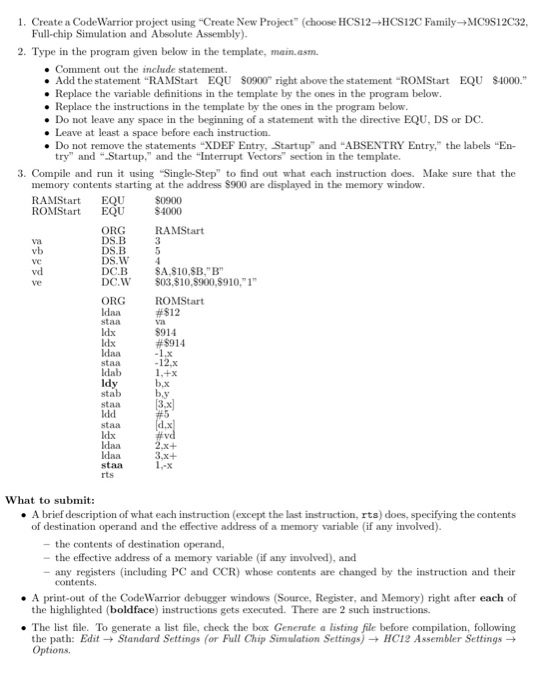
1. Create a CodeWarrior project using "Create New Project (choose HCS12+HCS12C FamilyMCOS12C32 Full-chip Simulation and Absolute Assembly 2. Type in the program given below in the template, main.asm Comment out the include statement . Add the statement "RAMStart EQU S0900 right above the statement "ROMStart EQU S4000." . Replace the variable definitions in the template by the ones in the program below . Replace the instructions in the template by the ones in the program below. . Do not leave any space in the beginning of a statement with the directive EQU, DS or DC. each instruction. try" and "Startup," and the Interrupt Vectors" section in the template. memory contents starting at the address $900 are displayed in the memory window Leave at least a space . Do not remove the statements "XDEF Entry, Startup and "ABSENTRY Entry, the labels "En- 3. Compile and run it using "Single-Step" to find out what each instruction does. Make sure that the RAMStart EQU S0900 ROMStart EQU $4000 ORG RAMStart vb DS.W 4 DC B DC.W S03,S10,8900,8910, 1 ORG vd ve SA.S10,SB,"B" ROMStart #$12 staa Idx #8914 staa Idab ldy staa staa 3,x+ 1,-x staa rts What to submit: .A brief description of what each instruction (except the last instruction, rts) does, specifying the contents of destination operand and the effective address of a memory variable (if any involved) - the contents of destination operand, - the effective address of a memory variable (if any involved), and - any registers (including PC and CCR) whose contents are changed by the instruction and their the highlighted (boldface) instructions gets executed. There are 2 such instructions the path: Edit-Standard Settings (or Full Chip Simulation Settings)-HC12 Assembler Settings - .A print-out of the CodeWarrior debugger windows (Source, Register, and Memory) right after each of . The list file. To generate a list file, check the box Generate a listing file before compilation, following Options 1. Create a CodeWarrior project using "Create New Project (choose HCS12+HCS12C FamilyMCOS12C32 Full-chip Simulation and Absolute Assembly 2. Type in the program given below in the template, main.asm Comment out the include statement . Add the statement "RAMStart EQU S0900 right above the statement "ROMStart EQU S4000." . Replace the variable definitions in the template by the ones in the program below . Replace the instructions in the template by the ones in the program below. . Do not leave any space in the beginning of a statement with the directive EQU, DS or DC. each instruction. try" and "Startup," and the Interrupt Vectors" section in the template. memory contents starting at the address $900 are displayed in the memory window Leave at least a space . Do not remove the statements "XDEF Entry, Startup and "ABSENTRY Entry, the labels "En- 3. Compile and run it using "Single-Step" to find out what each instruction does. Make sure that the RAMStart EQU S0900 ROMStart EQU $4000 ORG RAMStart vb DS.W 4 DC B DC.W S03,S10,8900,8910, 1 ORG vd ve SA.S10,SB,"B" ROMStart #$12 staa Idx #8914 staa Idab ldy staa staa 3,x+ 1,-x staa rts What to submit: .A brief description of what each instruction (except the last instruction, rts) does, specifying the contents of destination operand and the effective address of a memory variable (if any involved) - the contents of destination operand, - the effective address of a memory variable (if any involved), and - any registers (including PC and CCR) whose contents are changed by the instruction and their the highlighted (boldface) instructions gets executed. There are 2 such instructions the path: Edit-Standard Settings (or Full Chip Simulation Settings)-HC12 Assembler Settings - .A print-out of the CodeWarrior debugger windows (Source, Register, and Memory) right after each of . The list file. To generate a list file, check the box Generate a listing file before compilation, following Options
Step by Step Solution
There are 3 Steps involved in it

Get step-by-step solutions from verified subject matter experts
 Study Help