







Question: 1. Create a form in C# that accepts scores from the user, displays the total, count, and average of the scores, and displays a dialog
1. Create a form in C# that accepts scores from the user, displays the total, count, and average of the scores, and displays a dialog box that lists the scores. The design of the Score Calculator form and the Scores dialog box Operation
2. The user enters a score (up to 5) and clicks the Add button or presses the Enter key. The application calculates and displays the score total, score count, and average score. If the user clicks the Display scores button, the application displays them in a message box. If only 3 scores are entered then only 3 scores should show up in the display. If the user clicks the Clear scores button, the application removes all the scores and clears the score, score total, score count, and average controls.
3. Specifications - This application should check the number entered by the user to make sure it is a valid integer from 0 to 100. Use the I O approach to design the program. Limit the number of module level variables by passing information to subs/functions and returning results. You will need a module level (global) array to store the scores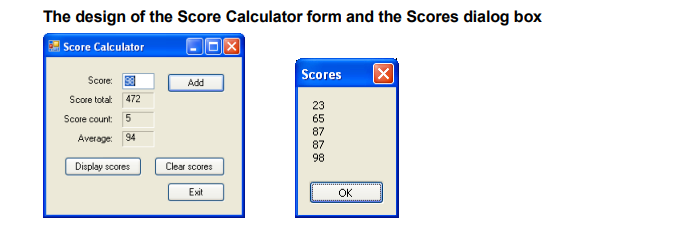
The design of the Score Calculator form and the Scores dialog box Score Calculator (SEK Scores Score: Score total: 472 Score count: 5 23 65 87 87 98 Average: 94 Display scores Clear scores Exit OK
Step by Step Solution
There are 3 Steps involved in it

Get step-by-step solutions from verified subject matter experts
 Study Help