







Question: 1. Create a formula in cell D6 that uses the quantity of lemonade for the first month and the price of lemonade to calculate that
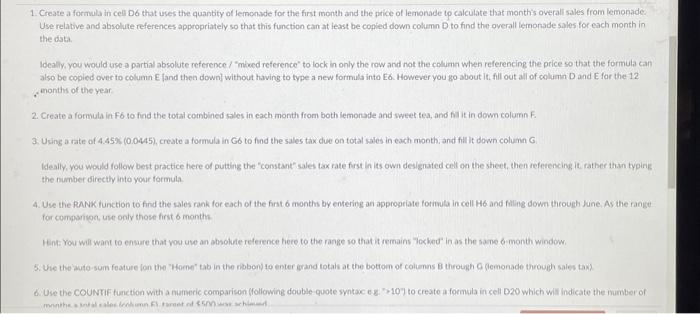

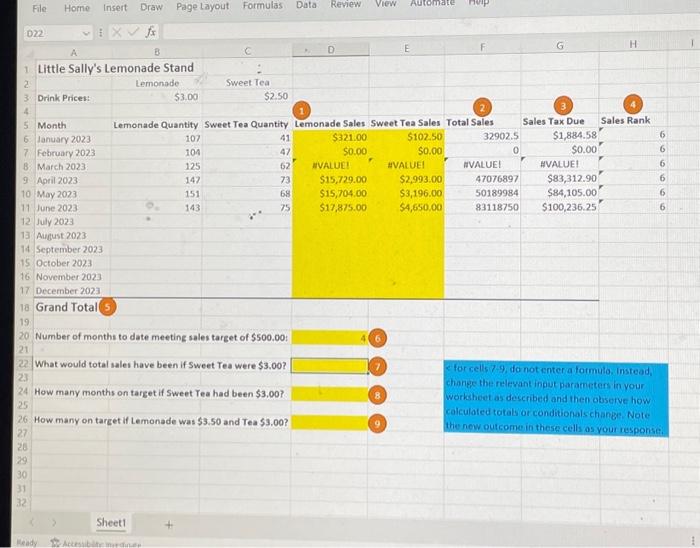
1. Create a formula in cell D6 that uses the quantity of lemonade for the first month and the price of lemonade to calculate that month's overali sales from lemonade Use relative and absolute references appropriately so that this function can at least be copied down column D to find the overall lemorade sales for each month in the data. Ideally. you would use a partial absolute reference / "mked reference" to lock in only the row and not the columa when referencing the price so that the formula can also be copied over to column E fand then down\} without having to type a new formula into E6. However you go about it. fill out all of columin D and E for the 12 , enonths of the year 2. Create a formula in F6 to find the total combined sales in each month from both lemonade and sweet tea, and fil it in dewn column E. 3. Using a rate of 4.45%(0.0445), create a formula in G6 to find the sales tax due on total isales in each month; and fill it down column G. Ifeally, you would follow best practice here of putting the "constant" sales tax rate frat in its own designated cell on the sheet, then referencing it rather than typing the number directly into your formula. 4. Use the PANk function to find the sales rank for each of the fint 6 months by enterieg an appropriate forimula in cell H6 and filing dowm theough June. As the fange for comparisoc, use only thase first 6 month. Hent You will want to ensure that vou uve an absolute reference here to the range so that it remains "Toxbed" in as the sase 6 -month window. 6. Use the COUNTIF furiction with a numeric comparison ffollowing double-quote syntac ey. "2107 to create a formula in cell D20 which will indicate the inumber of 5. Use the auto-sum feature (on the "Horne' tab in the ribbon) to enter grand totals at the bottom of columns through G (iemonade through sales tax). 6, Use the COUNTIF functoon with a mumeric comparison (following double guote syntac e. " >10 ) to crestea formula in cell D20 which will indicate the number of months a total sales (column F) target of 5500 was achieved. 7. Change the parameters as indicated for items 7.9 and note (as a number entered directly into the indicated cell, not uning a formula) the requested outcome
Step by Step Solution
There are 3 Steps involved in it

Get step-by-step solutions from verified subject matter experts
 Study Help