







Question: 1. Create a new HTML file called nature.html. Make sure it has all of the tags necessary to pass validation. This HTML page should have
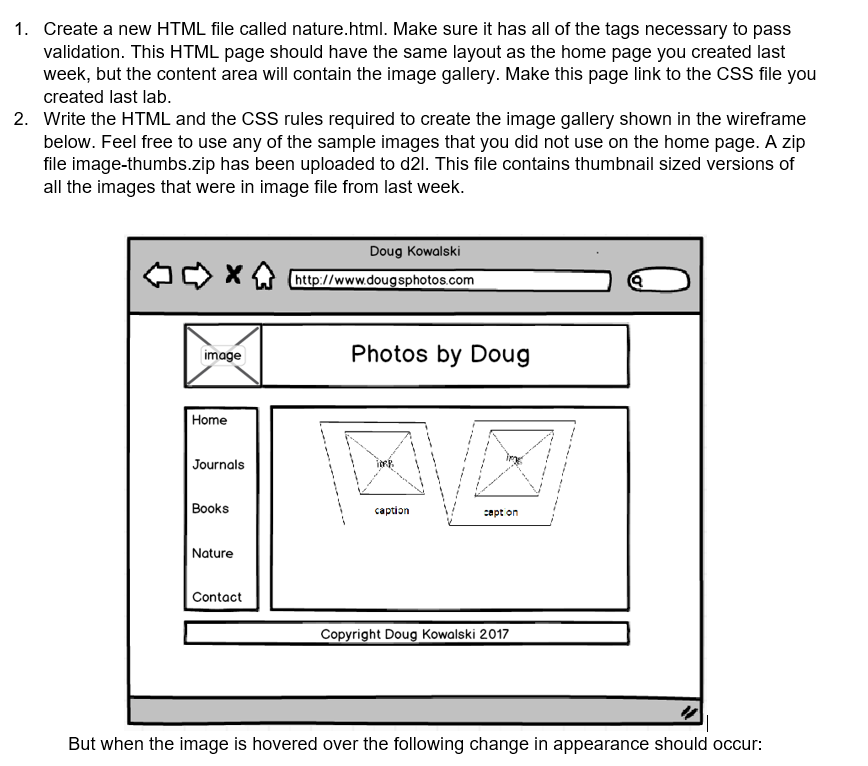
1. Create a new HTML file called nature.html. Make sure it has all of the tags necessary to pass validation. This HTML page should have the same layout as the home page you created last week, but the content area will contain the image gallery. Make this page link to the CSS file you created last lab. 2. Write the HTML and the CSS rules required to create the image gallery shown in the wireframe below. Feel free to use any of the sample images that you did not use on the home page. A zip file image-thumbs.zip has been uploaded to d2l. This file contains thumbnail sized versions of all the images that were in image file from last week. X Doug Kowalski http://www.dougsphotos.com image Photos by Doug Home Journals Books caption capt on Nature Contact Copyright Doug Kowalski 2017 But when the image is hovered over the following change in appearance should occur
Step by Step Solution
There are 3 Steps involved in it

Get step-by-step solutions from verified subject matter experts
 Study Help