







Question: 1. Create following table with same data in excel and save file as data_yourname_regno.xlsx # Name 1 Muhammad Asif 2 Ishtiaq All 3 Sana Haider
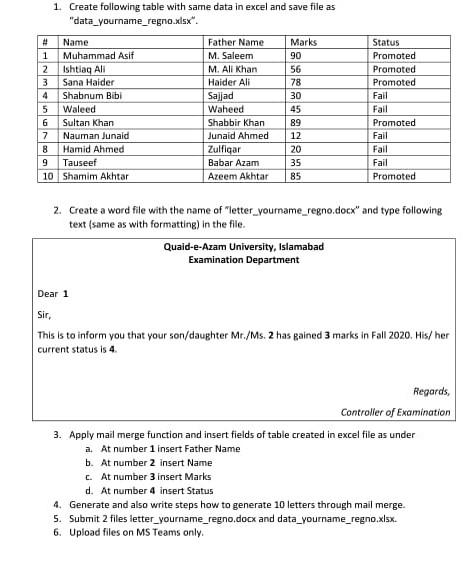
1. Create following table with same data in excel and save file as "data_yourname_regno.xlsx # Name 1 Muhammad Asif 2 Ishtiaq All 3 Sana Haider 4 Shabnum Bibi 5 Waleed 6 Sultan Khan 7 Nauman Junaid 8 Hamid Ahmed 9 Tauseef 10 Shamim Akhtar Father Name M. Saleem M. All Khan Haider Ali Sajad Waheed Shabbir Khan Junaid Ahmed Zulfiqar Babar Azam Azeem Akhtar Marks 90 56 78 30 45 89 12 20 35 85 Status Promoted Promoted Promoted Fail Fail Promoted Fail Fail Fail Promoted 2. Create a word file with the name of letter_yourname_regno.docx" and type following text (same as with formatting) in the file. Quaid-e-Azam University, Islamabad Examination Department Dear 1 Sir, This is to inform you that your son/daughter Mr./Ms. 2 has gained 3 marks in Fall 2020. His/her current status is 4. Regards, Controller of Examination 3. Apply mail merge function and insert fields of table created in excel file as under a. At number 1 Insert Father Name b. At number 2 insert Name c. At number 3 insert Marks d. At number 4 insert Status 4. Generate and also write steps how to generate 10 letters through mail merge 5. Submit 2 files letter_yourname_regno.docx and data_yourname_regno.xlsx 6. Upload files on MS Teams only
Step by Step Solution
There are 3 Steps involved in it

Get step-by-step solutions from verified subject matter experts
 Study Help