







Question: 1. How do I open the function popup window? a. Start with in a cell. b. Click on fi insert function icon c. Right click
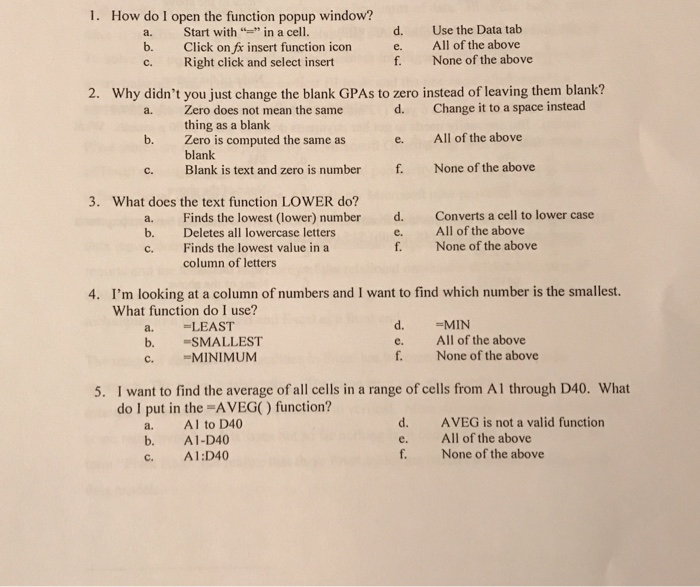
1. How do I open the function popup window? a. Start with in a cell. b. Click on fi insert function icon c. Right click and select insert d. Use the Data tab e. All of the above f. None of the above 2. Why didn't you just change the blank GPAs to zero instead of leaving them blank? d. Change it to a space instead a. Zero does not mean the same b. Zero is computed the same as c. Blank is text and zero is numberf. None of the above thing as a blank e. All of the above blank 3. What does the text function LOWER do? a. Finds the lowest (lower) number d. Converts a cell to lower case b. Deletes all lowercase letters e. All of the above f. None of the above Finds the lowest value in a column of letters c. I'm looking at a column of numbers and I want to find which number is the smallest. What function do I use? 4. a. LEAST b. =SMALLEST d. MIN e. All of the above f None of the above c. MINIMUM 5. I want to find the average of all cells in a range of cells from Al through D40. What do l put in the -AVEG) function? a. Al to D40 b. A1-D40 C. Al:D40 d. AVEG is not a valid function e. All of the above f None of the above
Step by Step Solution
There are 3 Steps involved in it

Get step-by-step solutions from verified subject matter experts
 Study Help