







Question: 1. In Brackets, open your template.html file and use Save As to save the file as yourname_mod3_4.html in the module3 folder. (NOTE: I have noticed
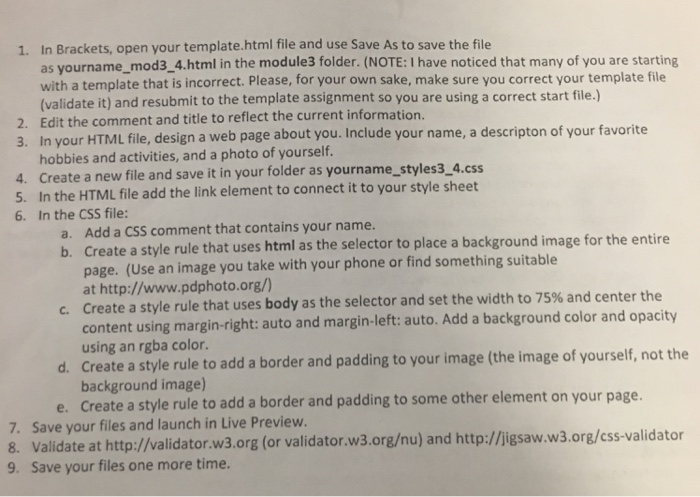
1. In Brackets, open your template.html file and use Save As to save the file as yourname_mod3_4.html in the module3 folder. (NOTE: I have noticed that many of you are starting with a template that is incorrect. Please, for your own sake, make sure you correct your template file (validate it) and resubmit to the template assignment so you are using a correct start file.) 2. Edit the comment and title to reflect the current information. 3. In your HTML file, design a web page about you. Include your name, a descripton of your favorite hobbies and activities, and a photo of yourself 4. Create a new file and save it in your folder as yourname_styles3 4.s 5. In the HTML file add the link element to connect it to your style sheet 6. In the CSS file Add a CSS comment that contains your name. Create a style rule that uses html as the selector to place a background image for the entire page. (Use an image you take with your phone or find something suitable at http://www.pdphoto.org/) Create a style rule that uses body as the selector and set the width to 75% and center the content using margin-right: auto and margin-left: auto. Add a background color and opacit using an rgba color Create a style rule to add a border and padding to your image (the image of yourself, not the background image) Create a style rule to add a border and padding to some other element on your page. a. b. c. d. 7. 8. 9. Save your files and launch in Live Preview. Validate at http://wvalidator.w3.org (or validator.w3.orgu) and http://igsaw.w3.org/css-validator Save your files one more time
Step by Step Solution
There are 3 Steps involved in it

Get step-by-step solutions from verified subject matter experts
 Study Help