







Question: 1. Select a database management system to use for this lesson. Options include Microsoft SQL Server, MySQL, Oracle Database, and PostgreSQL. 2. Select a graphic
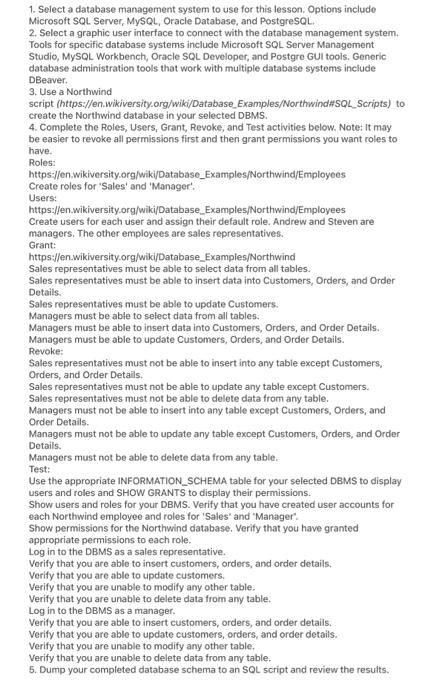
1. Select a database management system to use for this lesson. Options include Microsoft SQL Server, MySQL, Oracle Database, and PostgreSQL. 2. Select a graphic user interface to connect with the database management system. Tools for specific database systems include Microsoft SQL Server Management Studio, MySQL Workbench, Oracle SQL Developer, and Postgre GUI tools. Generic database administration tools that work with multiple database systems include DBeaver. 3. Use a Northwind script (https://en.wikiversity.org/wiki/Database_Examples/Northwind\#SQL_Scripts) to create the Northwind database in your selected DBMS. 4. Complete the Roles, Users, Grant, Revoke, and Test activities below. Note: It may be easier to revoke all permissions first and then grant permissions you want roles to have. Roles: https://en.wikiversity.org/wiki/Database_Examples/Northwind/Employees Create roles for 'Sales' and 'Manager'. Users: https://en.wikiversity.org/wiki/Database_Examples/Northwind/Employees Create users for each user and assign their default role. Andrew and Steven are managers. The other employees are sales representatives. Grant: https://en.wikiversity.org/wiki/Database_Examples/Northwind Sales representatives must be able to select data from all tables. Sales representatives must be able to insert data into Customers, Orders, and Order Details. Sales representatives must be able to update Customers. Managers must be able to select data from all tables. Managers must be able to insert data into Customers, Orders, and Order Details. Managers must be able to update Customers, Orders, and Order Details. Revoke: Sales representatives must not be able to insert into any table except Customers, Orders, and Order Details. Sales representatives must not be able to update any table except Customers. Sales representatives must not be able to delete data from any table. Managers must not be able to insert into any table except Customers, Orders, and Order Details. Managers must not be able to update any table except Customers, Orders, and Order Details. Managers must not be able to delete data from any table. Test: Use the appropriate INFORMATION_SCHEMA table for your selected DBMS to display users and roles and SHOW GRANTS to display their permissions. Show users and roles for your DBMS. Verify that you have created user accounts for each Northwind employee and roles for 'Sales' and 'Manager'. Show permissions for the Northwind database. Verify that you have granted appropriate permissions to each role. Log in to the DBMS as a sales representative. Verify that you are able to insert customers, orders, and order details. Verify that you are able to update customers. Verify that you are unable to modify any other table. Verify that you are unable to delete data from any table. Log in to the DBMS as a manager. Verify that you are able to insert customers, orders, and order details. Verify that you are able to update customers, orders, and order details. Verify that you are unable to modify any other table. Verify that you are unable to delete data from any table. 5. Dump your completed database schema to an SQL script and review the results
Step by Step Solution
There are 3 Steps involved in it

Get step-by-step solutions from verified subject matter experts
 Study Help