







Question: do activities Activities [edi |edt source] 1. Select a database management system to use for this lesson Options indude Microsoft SOL Server, MySOL, Orade Database,
![do activities Activities [edi |edt source] 1. Select a database management system](https://dsd5zvtm8ll6.cloudfront.net/si.experts.images/questions/2024/09/66f45e89efe04_01766f45e898f0e4.jpg)
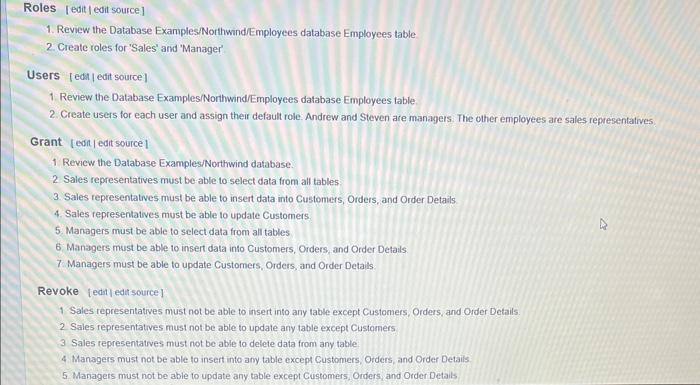


Activities [edi |edt source] 1. Select a database management system to use for this lesson Options indude Microsoft SOL Server, MySOL, Orade Database, and PostgresoL. 2 Select a graphic user interface to connect with the database management system Tools for specific database systems include Microsoft SOL Server Management Studio, MySCL Workbench, Oracle SOL Developer, and Postgre GUI tooks. Generic database administration fools that work with multple database systems include DBeaver 3. Use a Northwind scriph to create the Northwind database in your selected DBMS 4. Complete the Roles, Users, Grant, Revoke, and Test activities below. Note. It may be easier to revoke all permissions first and then grant pemissions you want roles to have. 5 Dump your completed database schema to an SOL script and review the results: Microsoft SQL Server [edi ] edi source] 1. For Linux and Windows. Download a free edition of Micaosoft SQL Server E DBMS 2. Download and install Miciosott SOL. Server Management Studiots (Windows) or Micosol Azure Data Studio Le (Linco) 3. Complete one of more of the following tutorals using SOL Server and SOL Server Management Studio - SOL. Server Tutonal ti - Mcrosoft Dotabase Engine Tutorals se - Guru99 MS SOL server Tutorale 4. Revew Microsoft CREATE LOOINUZ and practice creming logins for your DAMS. 5. Review Microsoft CREATE USERLC and practice odding users to a database 6. Review Miciosolt. CREATE ROLELC and pracice adding toles to a database. 7. Review Michoweft Join a Role is and practice adding users to roles. 8. Review Miciosth GRANI ec and practice granting permissons to roles. 9. Reven Micioson. TABLE. PRIVILECES LZ and pactice desplaying table privileges Roles [ edit | edit source] 1. Review the Database Examples/NorthwindEmployees database Employees table 2. Create roles for 'Sales' and 'Manager' Users [edt |edit source] 1. Review the Database Examples/Northwind/Employees database Employees table 2. Create users for each user and assign their default role. Andrew and Steven are managers. The olher employees are sales representatives. Grant [edif]edit source] 1 Review the Database ExamplesiNorthwind database. 2 Sales representatives must be able to select data from all tables 3. Sales representatives must be able to insert data into Customers, Orders, and Order Details. 4. Sales representatives must be able to update Customers. 5 Managers must be able to select data from all tables. 6. Managers must be able to insert data into Customers, Orders, and Order Details: 7. Managers must be able to update Customers, Orders, and Order Details. Revoke [edit ledt source ] 1 Sales representatives must not be able to insert into any table except Customers, Orders, and Order Details. 2. Sales representatives must not be able to update any table except Customers 3 Sales representatives must not be able to delete data from any tatle: 4. Managers must not be able to insert into any table except Customers, Orders, and Order Details. 5 Managers must not be able to update any table except Customers, Orders, and Order Details Revoke [ceit]edit source] 1 Sales representatives marst not be oble to insert into any table except Customers, Orders, and Order Detals. 2 Sales representatives must not be able to update any table except Customers 3. Sales representatives must not be able to delete data from any table: 4. Managers must not be able to insert into any table except Customers, Orders, and Order Details: 5. Managers must not be able to update any table except Customers, Orders, and Order Detals 6. Managers must not be able to delele data from any table Test [edi [ edt source] 1. Use the appropiate IWFOEMATION SCHEM lable for your selecied DEMS to display users and roles and to display their permissions - Show usens and roles for your DOMS. Venfy that you have ceated user accourits for each Norttinind employee and roles for 'sales' and Manager' - Show permissons for the Nortiwind database Venty that you have granted appropriate permissions to each role 2. Log in to the DBMS as a sales representative: - Venily that you are able to insert cuslorees, orders, and order detals - Verily that you are able to update customers - Venfy that you are unable to modify any other table - Verity that you are unable to delete data from any table 3. Log in to the DeMS as a managet - Verify that you aire able to inset customers, orders, and order detais - Verify that you are able to update customers, onders, and otder detalls - Venily that you are unable to modily any other table. - Verify that you are unable to delote data from any tattle Complete all lesson activities. Use INFORMATION SCHEMA and SHOW GRANTS queries to display user accounts, roles, and privilegos created for the Northwind database Include the resuls of the queries. Then add a 100 -word summary at the top describing what you leamed whill completing the activities In this lesson and how you can apply that learning to your own current of future environment. Soe the Asignment Rubric under Course Materials for more information
Step by Step Solution
There are 3 Steps involved in it

Get step-by-step solutions from verified subject matter experts
 Study Help