







Question: 1. Try the following command sequence: od - pwd ls -al cd (where did that get you?) ed .. pwd Is-al od pwd ls -al
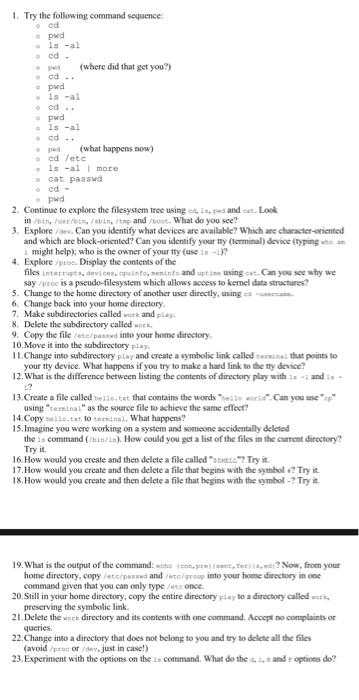
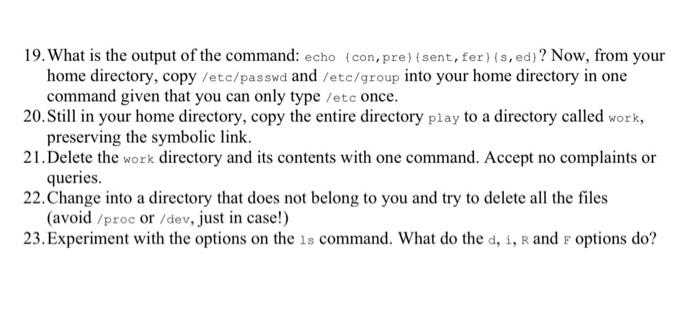
1. Try the following command sequence: od - pwd ls -al cd (where did that get you?) ed .. pwd Is-al od pwd ls -al cd .. (what happens now) ed /etc ls -al more cat passwd ed - pwd 2. Continue to explore the filesystem tree using Insped and us. Look in ///ehitpand/bout. What do you see? 3. Explore/dev. Can you identify what devices are available? Which are character-oriented and which are block-oriented? Can you identify your ty terminal) device (typing 1 might help), who is the owner of your tty (use 1-1) 4. Explore/pro. Display the contents of the files interrupte, devices muito into and pine using at. Can you see why we say /proc is a pseudo-filesystem which allows access to kernel data structures? 5. Change to the home directory of another user directly, using = 6. Change back into your home directory 7. Make subdirectories called and play 8. Delete the subdirectory called work 9. Copy the file/et/passwd into your home directory 10. Move it into the subdirectory play 11. Change into subdirectory play and create a symbolic link called trial that points to your tty device. What happens if you try to make a hard link to the ty device? 12. What is the difference between listing the contents of directory play with and ..? 13.Create a file called ello.txt that contains the words led. Can you use using "terminal" as the source file to achieve the same effect? 14.Copyello.txt lottinol. What happens? 15. Imagine you were working on a system and someone accidentally deleted the is command (/hin/s). How could you get a list of the files in the current directory? Try it . 16. How would you create and then delete a a file called "s"? Try it 17. How would you create and then delete a file that begins with the symbol2 Try it 18. How would you create and then delete a file that begins with the symbol-? Try it 19. What is the output of the command: che prefer? Now, from your home directory.copy /etc/pared and /etc/group into your home directory in one command given that you can only type/te once 20. Still in your home directory, copy the entire directory play to a directory called preserving the symbolic link. 21. Delete the sea directory and its contents with one command. Accept no complaints or 22. Change into a directory that does not belong to you and try to delete all the files (avoid proc ordev, just in case!) 23. Experiment with the options on the is command. What do the ... and options do? 1. Try the following command sequence: ed pwd ls -al ed. (where did that get you?) ed .. pwd ls -al ed pwd ls -al ed O (what happens now cd leta ls -al more cat passwd pwd 2. Continue to explore the filesystem tree using od 15.wandcat. Look in /bin, /usr/bin/bin/pand/boot. What do you see? 3. Explore/de. Can you identify what devices are available? Which are character-oriented and which are block-oriented? Can you identify your tty (terminal device (typingan 1. might help), who is the owner of your tty (use 1: -1)2 4. Explore/pros Display the contents of the files interrupts, devices, apunto, meninto and uptime using cat. Can you see why we say /proc is a pseudo-Filesystem which allows access to kernel data structures? 5. Change to the home directory of another user directly, using 6. Change back into your home directory 7. Make subdirectories called work and play. 8. Delete the subdirectory called work. 9. Copy the file/et/passwd into your home directory 10. Move it into the subdirectory play. 11. Change into subdirectory play and create a symbolic link called sina that points to your tty device. What happens if you try to make a hard link to the ty device? 12. What is the difference between listing the contents of directory play with 1-1 and .? 13. Create a file called hello.txt that contains the words "hello world". Can you use using "terminal as the source file to achieve the same effect? 14.Copy bello.txt to terminal. What happens? 15. Imagine you were working on a system and someone accidentally deleted the command(in). How could you get a list of the files in the current directory Try it. 16. How would you create and then delete a file called "sz? Try it. 17. How would you create and then delete a file that begins with the symbol.? Try it 18. How would you create and then delete a file that begins with the symbol-2 Try it. 19. What is the output of the command: echo (compre) suntet? Now, from your home directory, copy /etc/patawa and etc/soup into your home directory in one command given that you can only type /etc once. 20. Still in your home directory, copy the entire directory lay to a directory called work preserving the symbolic link. 21. Delete the wore directory and its contents with one command. Accept no complaints or queries. 22. Change into a directory that does not belong to you and try to delete all the files (avoid /proc or/dev.just in case!) 23. Experiment with the options on the 12 command. What do the cand options do? 19. What is the output of the command: echo (con, pre)sent, fer) (s, ed) ? Now, from your home directory, copy /etc/passwd and /etc/group into your home directory in one command given that you can only type /etc once. 20. Still in your home directory, copy the entire directory play to a directory called work, preserving the symbolic link. 21. Delete the work directory and its contents with one command. Accept no complaints or queries. 22. Change into a directory that does not belong to you and try to delete all the files (avoid /proc or /dev, just in case!) 23.Experiment with the options on the is command. What do the d, i, R and r options do? 1. Try the following command sequence: cd o pwd ols -al cd. Opwd (where did that get you?) o pwd ls -al cd .. cd .. o opwd O o o pwd ls -al cd (what happens now) cd /etc ls -al more cat passwd cd - pwd 2. Continue to explore the filesystem tree using cd, 1s, pued and est. Look in /bin, /usr/bin, /sbin/tep and/boot. What do you see? 3. Explore /dev. Can you identify what devices are available? Which are character-oriented and which are block-oriented? Can you identify your tty (terminal) device (typing who i might help); who is the owner of your tty (use is -+)? 4. Explore /proc. Display the contents of the files interrupts, devices, cpuinto, meninto and upties using cat. Can you see why we say /proc is a pseudo-filesystem which allows access to kernel data structures? 5. Change to the home directory of another user directly, using cd-username. 6. Change back into your home directory. 7. Make subdirectories called work and play. 8. Delete the subdirectory called work. 9. Copy the file /etc/passwd into your home directory. 10. Move it into the subdirectory play. 11. Change into subdirectory play and create a symbolic link called terminal that points to your tty device. What happens if you try to make a hard link to the tty device? 12.What is the difference between listing the contents of directory play with is -1 and 1s L? 13. Create a file called hello.txt that contains the words "hello world". Can you use using "terminai" as the source file to achieve the same effect? 14.Copy hello.txt to terminal. What happens? 15. Imagine you were working on a system and someone accidentally deleted the is command (/bin/1s). How could you get a list of the files in the current directory? Try it. 16. How would you create and then delete a file called "SHELL"? Try it. 17. How would you create and then delete a file that begins with the symbol +? Try it. 18. How would you create and then delete a file that begins with the symbol-? Try it
Step by Step Solution
There are 3 Steps involved in it

Get step-by-step solutions from verified subject matter experts
 Study Help