







Question: 1) Use MATLAB to write a loop that splits signal x in non-overlapping segments of length 50 and places each segment in a MATLAB cell.
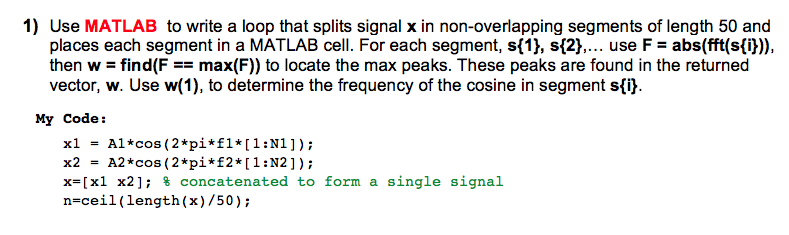
1) Use MATLAB to write a loop that splits signal x in non-overlapping segments of length 50 and places each segment in a MATLAB cell. For each segment, sf1), sf2),.. use F- abs(fft(sfij)) then w-find(F = max(F)) to locate the max peaks. These peaks are found in the returned vector, w. Use w(1), to determine the frequency of the cosine in segment sfi] My Code: x1Al*cos (2 pi*fl [1:N1]); x2A2*cos (2*pi*2*[1:N2]); x-[x1 x2]; % concatenated to form a single signal n-ceil(length(x)/50) 1) Use MATLAB to write a loop that splits signal x in non-overlapping segments of length 50 and places each segment in a MATLAB cell. For each segment, sf1), sf2),.. use F- abs(fft(sfij)) then w-find(F = max(F)) to locate the max peaks. These peaks are found in the returned vector, w. Use w(1), to determine the frequency of the cosine in segment sfi] My Code: x1Al*cos (2 pi*fl [1:N1]); x2A2*cos (2*pi*2*[1:N2]); x-[x1 x2]; % concatenated to form a single signal n-ceil(length(x)/50)
Step by Step Solution
There are 3 Steps involved in it

Get step-by-step solutions from verified subject matter experts
 Study Help