Question: . 1. Use MS Project or SmartSheet to create a Gantt Chart. O In your submission ensure the following columns are visible: WBS Number and
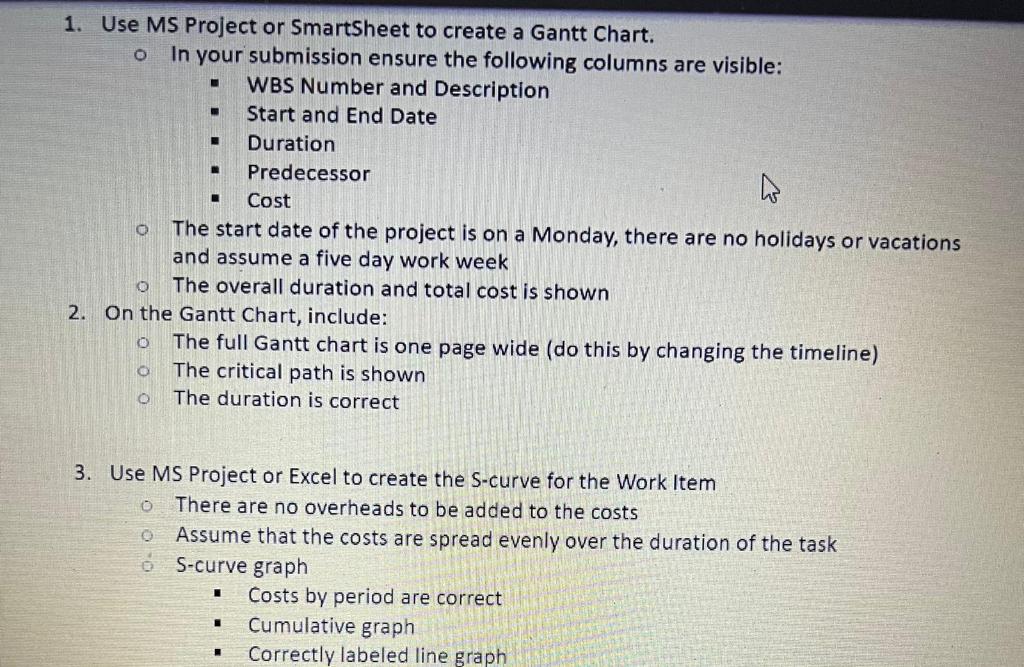
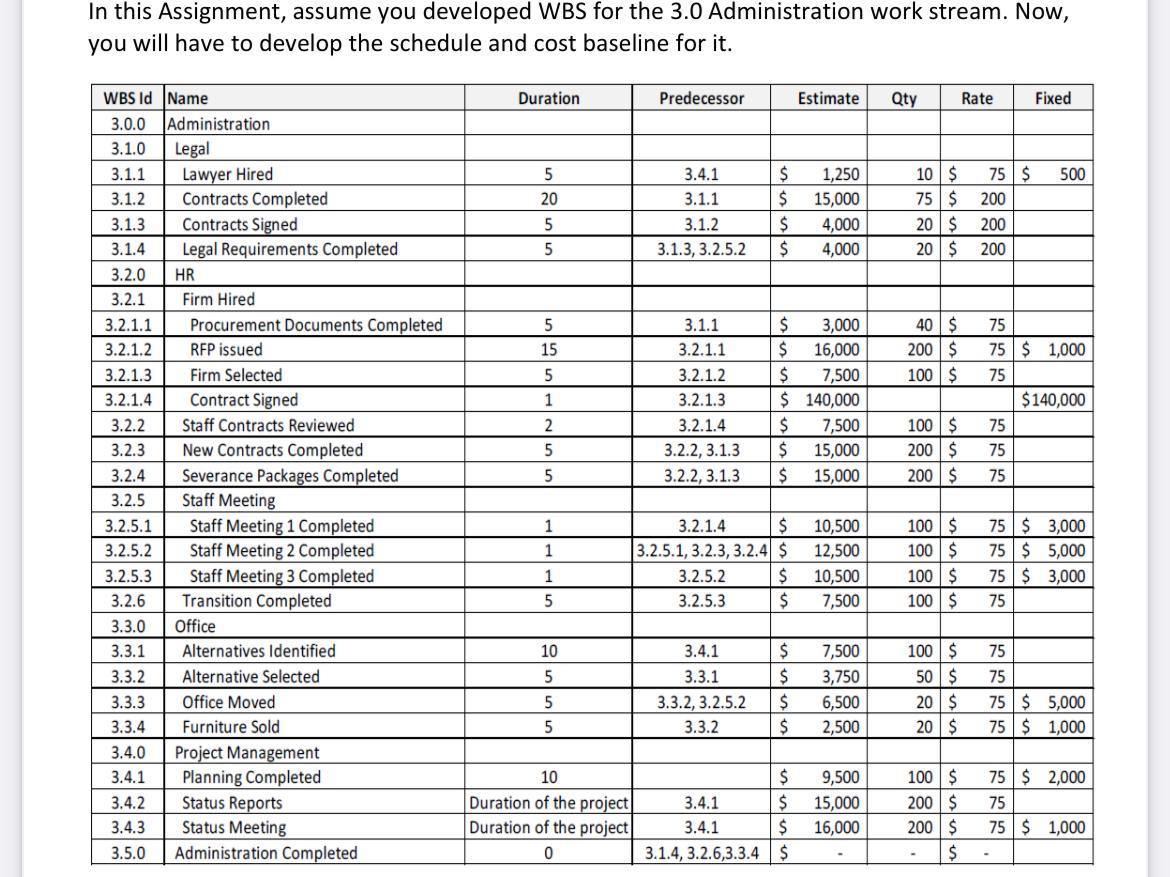
. 1. Use MS Project or SmartSheet to create a Gantt Chart. O In your submission ensure the following columns are visible: WBS Number and Description Start and End Date Duration Predecessor Cost The start date of the project is on a Monday, there are no holidays or vacations and assume a five day work week The overall duration and total cost is shown 2. On the Gantt Chart, include: The full Gantt chart is one page wide (do this by changing the timeline) The critical path is shown The duration is correct 0 O O o 3. Use MS Project or Excel to create the S-curve for the Work Item There are no overheads to be added to the costs Assume that the costs are spread evenly over the duration of the task 6 S-curve graph Costs by period are correct Cumulative graph Correctly labeled line graph . . In this Assignment, assume you developed WBS for the 3.0 Administration work stream. Now, you will have to develop the schedule and cost baseline for it. Duration Predecessor Estimate Qty Rate Fixed 500 5 20 5 5 3.4.1 3.1.1 3.1.2 3.1.3, 3.2.5.2 $ $ $ $ 1,250 15,000 4,000 4,000 10$ 75$ 20$ 20 $ 75 $ 200 200 200 3.1.4 5 15 5 1 2 40$ 200$ 100$ WBS Id Name 3.0.0 Administration 3.1.0 Legal 3.1.1 Lawyer Hired 3.1.2 Contracts Completed 3.1.3 Contracts Signed Legal Requirements Completed 3.2.0 HR 3.2.1 Firm Hired 3.2.1.1 Procurement Documents Completed 3.2.1.2 RFP issued 3.2.1.3 Firm Selected 3.2.1.4 Contract Signed 3.2.2 Staff Contracts Reviewed 3.2.3 New Contracts Completed 3.2.4 Severance Packages Completed 3.2.5 Staff Meeting 3.2.5.1 Staff Meeting 1 Completed 3.2.5.2 Staff Meeting 2 Completed 3.2.5.3 Staff Meeting 3 Completed 3.2.6 Transition Completed 3.3.0 Office 3.3.1 Alternatives Identified 3.3.2 Alternative Selected 3.3.3 Office Moved 3.3.4 Furniture Sold 3.4.0 Project Management 3.4.1 Planning Completed 3.4.2 Status Reports 3.4.3 Status Meeting 3.5.0 Administration Completed 3.1.1 3.2.1.1 3.2.1.2 3.2.1.3 3.2.1.4 3.2.2, 3.1.3 3.2.2, 3.1.3 $ 3,000 $ 16,000 $ 7,500 $ 140,000 $ 7,500 $ 15,000 $ 15,000 75 75 $ 1,000 75 $140,000 75 75 5 5 100$ 200 $ 200 $ 75 1 1 3.2.1.4 $ 3.2.5.1, 3.2.3, 3.2.4 $ 3.2.5.2 $ 3.2.5.3 $ 10,500 12,500 10,500 7,500 100 $ 100$ 100 $ 100$ 75$ 3,000 75 $5,000 75$ 3,000 75 1 5 75 10 5 nu 3.4.1 3.3.1 3.3.2, 3.2.5.2 3.3.2 $ $ $ $ 7,500 3,750 6,500 2,500 100$ 50 $ 20$ 20$ 5 5 75 75 $ 5,000 75 $ 1,000 10 Duration of the project Duration of the project $ 3.4.1 $ 3.4.1 $ 3.1.4, 3.2.6,3.3.4 $ Telenleol 9,500 15,000 16,000 100 $ 200 $ 200$ $ 75$ 2,000 75 75 $ 1,000 004 - . 1. Use MS Project or SmartSheet to create a Gantt Chart. O In your submission ensure the following columns are visible: WBS Number and Description Start and End Date Duration Predecessor Cost The start date of the project is on a Monday, there are no holidays or vacations and assume a five day work week The overall duration and total cost is shown 2. On the Gantt Chart, include: The full Gantt chart is one page wide (do this by changing the timeline) The critical path is shown The duration is correct 0 O O o 3. Use MS Project or Excel to create the S-curve for the Work Item There are no overheads to be added to the costs Assume that the costs are spread evenly over the duration of the task 6 S-curve graph Costs by period are correct Cumulative graph Correctly labeled line graph . . In this Assignment, assume you developed WBS for the 3.0 Administration work stream. Now, you will have to develop the schedule and cost baseline for it. Duration Predecessor Estimate Qty Rate Fixed 500 5 20 5 5 3.4.1 3.1.1 3.1.2 3.1.3, 3.2.5.2 $ $ $ $ 1,250 15,000 4,000 4,000 10$ 75$ 20$ 20 $ 75 $ 200 200 200 3.1.4 5 15 5 1 2 40$ 200$ 100$ WBS Id Name 3.0.0 Administration 3.1.0 Legal 3.1.1 Lawyer Hired 3.1.2 Contracts Completed 3.1.3 Contracts Signed Legal Requirements Completed 3.2.0 HR 3.2.1 Firm Hired 3.2.1.1 Procurement Documents Completed 3.2.1.2 RFP issued 3.2.1.3 Firm Selected 3.2.1.4 Contract Signed 3.2.2 Staff Contracts Reviewed 3.2.3 New Contracts Completed 3.2.4 Severance Packages Completed 3.2.5 Staff Meeting 3.2.5.1 Staff Meeting 1 Completed 3.2.5.2 Staff Meeting 2 Completed 3.2.5.3 Staff Meeting 3 Completed 3.2.6 Transition Completed 3.3.0 Office 3.3.1 Alternatives Identified 3.3.2 Alternative Selected 3.3.3 Office Moved 3.3.4 Furniture Sold 3.4.0 Project Management 3.4.1 Planning Completed 3.4.2 Status Reports 3.4.3 Status Meeting 3.5.0 Administration Completed 3.1.1 3.2.1.1 3.2.1.2 3.2.1.3 3.2.1.4 3.2.2, 3.1.3 3.2.2, 3.1.3 $ 3,000 $ 16,000 $ 7,500 $ 140,000 $ 7,500 $ 15,000 $ 15,000 75 75 $ 1,000 75 $140,000 75 75 5 5 100$ 200 $ 200 $ 75 1 1 3.2.1.4 $ 3.2.5.1, 3.2.3, 3.2.4 $ 3.2.5.2 $ 3.2.5.3 $ 10,500 12,500 10,500 7,500 100 $ 100$ 100 $ 100$ 75$ 3,000 75 $5,000 75$ 3,000 75 1 5 75 10 5 nu 3.4.1 3.3.1 3.3.2, 3.2.5.2 3.3.2 $ $ $ $ 7,500 3,750 6,500 2,500 100$ 50 $ 20$ 20$ 5 5 75 75 $ 5,000 75 $ 1,000 10 Duration of the project Duration of the project $ 3.4.1 $ 3.4.1 $ 3.1.4, 3.2.6,3.3.4 $ Telenleol 9,500 15,000 16,000 100 $ 200 $ 200$ $ 75$ 2,000 75 75 $ 1,000 004









 Study Help