





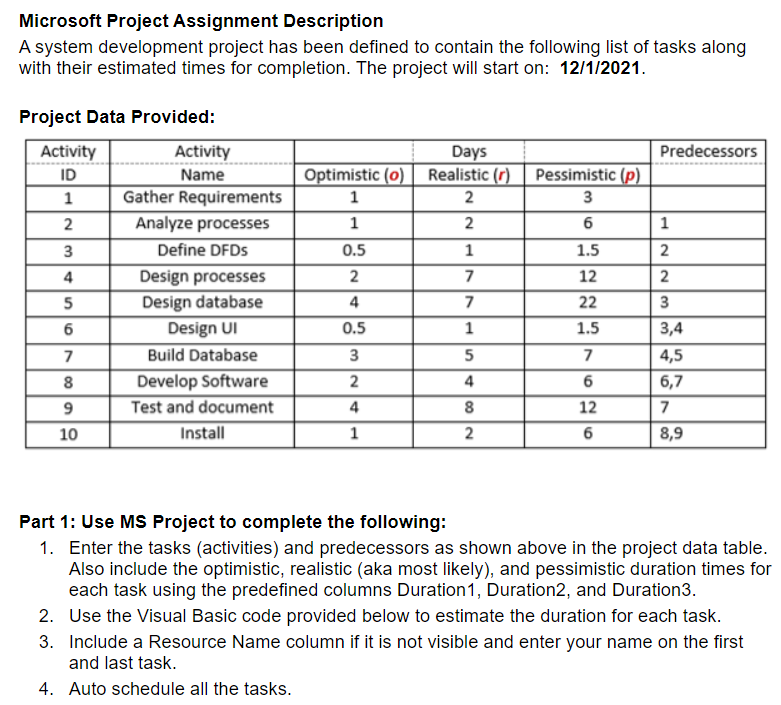
Question: Microsoft Project Assignment Description A system development project has been defined to contain the following list of tasks along with their estimated times for completion.
Microsoft Project Assignment Description A systemMicrosoft Project Assignment Description A systemMicrosoft Project Assignment Description A system

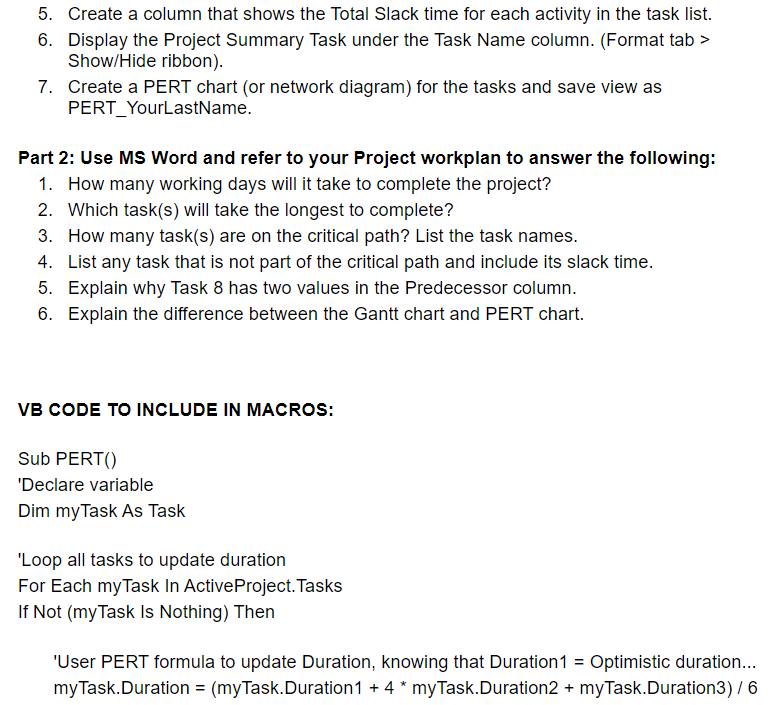
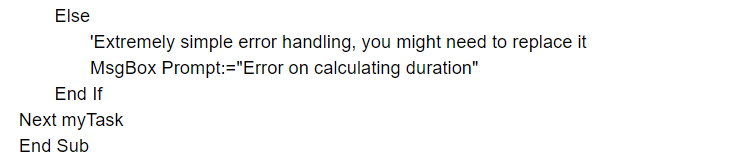
Microsoft Project Assignment Description A system development project has been defined to contain the following list of tasks along with their estimated times for completion. The project will start on: 12/1/2021. Predecessors Pessimistic (p) 3 6 Project Data Provided: Activity Activity ID Name 1 Gather Requirements 2. Analyze processes 3 Define DFDS 4 Design processes Design database 6 Design UI 7 Build Database 8 Develop Software 9 Test and document Install NIN Days Optimistic (0) Realistic (c) 1 2 1 2. 0.5 1 2 7 4 7 0.5 1 3 5 2 4 4 8 1 2 1.5 12 22 1.5 5 7 6 12 6 3 3,4 4,5 6,7 7 8,9 10 Part 1: Use MS Project to complete the following: 1. Enter the tasks (activities) and predecessors as shown above in the project data table. Also include the optimistic, realistic (aka most likely), and pessimistic duration times for each task using the predefined columns Duration 1, Duration2, and Duration3. 2. Use the Visual Basic code provided below to estimate the duration for each task. 3. Include a Resource Name column if it is not visible and enter your name on the first and last task. 4. Auto schedule all the tasks. 5. Create a column that shows the Total Slack time for each activity in the task list. 6. Display the Project Summary Task under the Task Name column. (Format tab > Show/Hide ribbon). 7. Create a PERT chart (or network diagram) for the tasks and save view as PERT_YourLastName. Part 2: Use MS Word and refer to your Project workplan to answer the following: 1. How many working days will it take to complete the project? 2. Which task(s) will take the longest to complete? 3. How many task(s) are on the critical path? List the task names. 4. List any task that is not part of the critical path and include its slack time. 5. Explain why Task 8 has two values in the Predecessor column. 6. Explain the difference between the Gantt chart and PERT chart. VB CODE TO INCLUDE IN MACROS: Sub PERT() 'Declare variable Dim myTask As Task 'Loop all tasks to update duration For Each myTask In Active Project. Tasks If Not (myTask Is Nothing) Then 'User PERT formula to update Duration, knowing that Duration 1 = Optimistic duration... myTask.Duration = (myTask.Duration 1 + 4* myTask.Duration 2 + myTask.Duration3) 76 Else 'Extremely simple error handling, you might need to replace it MsgBox Prompt:="Error on calculating duration" End If Next myTask End Sub
Step by Step Solution

There are 3 Steps involved in it

1 Expert Approved Answer
Step: 1 Unlock blur-text-image

Question Has Been Solved by an Expert!

Get step-by-step solutions from verified subject matter experts

Step: 2 Unlock
Step: 3 Unlock

Students Have Also Explored These Related General Management Questions!