





Question: 1. Write a PowerShell script to convert temperature from Celsius to Fahrenheit. You must follow these requirements. I WANT THE PS1 FILE AS TEXT FILE.
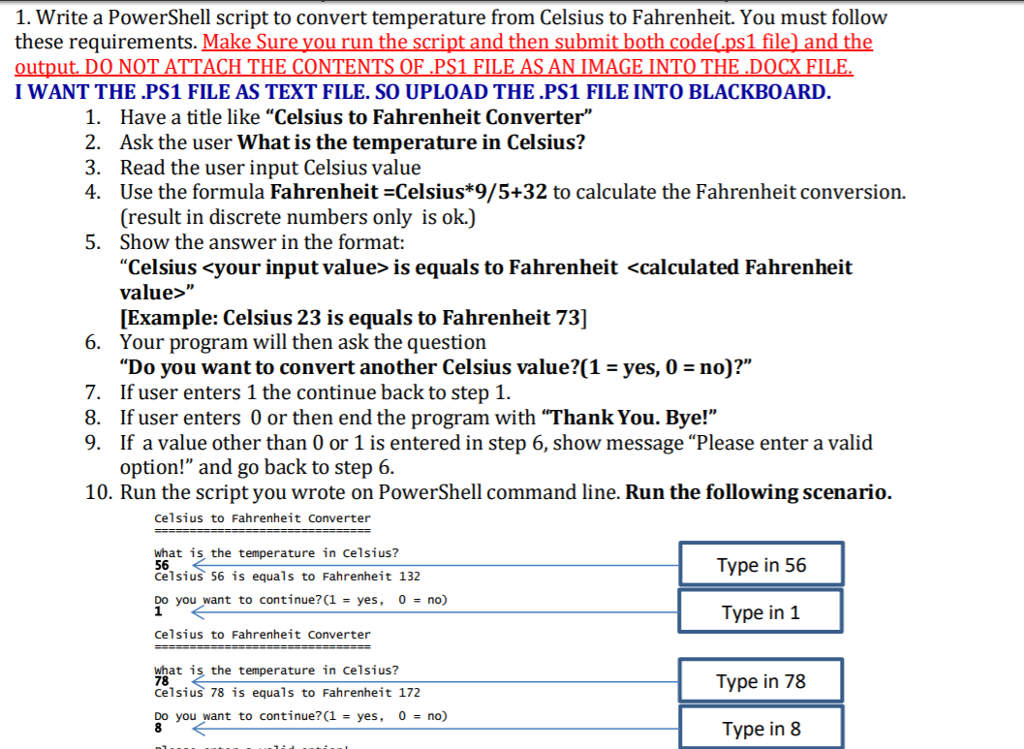
 1. Write a PowerShell script to convert temperature from Celsius to

1. Write a PowerShell script to convert temperature from Celsius to Fahrenheit. You must follow these requirements. I WANT THE PS1 FILE AS TEXT FILE. SO UPLOAD THE .PS1 FILE INTO BLACKBOARD Have a title like Celsius to Fahrenheit Converter" Ask the user What is the temperature in Celsius? Read the user input Celsius value Use the formula Fahrenheit -Celsius*9/5+32 to calculate the Fahrenheit conversion. (result in discrete numbers only is ok.) Show the answer in the format: "Celsius is equals to Fahrenheit [Example: Celsius 23 is equals to Fahrenheit 73] Your program will then ask the question "Do you want to convert another Celsius value?(1 - yes, 0 - no)?'" I. 2. 3. 4. 5. 6. 7. If user enters 1 the continue back to step 1. 8. If user enters 0 or then end the program with "Thank You. Bye!" 9. If a value other than 0 or 1 is entered in step 6, show message "Please enter a valid option!" and go back to step 6. 10. Run the script you wrote on PowerShell command line. Run the following scenario. Celsius to Fahrenheit converter what is, the temperature in Celsius? 56 celsius 56 is equals to Fahrenheit 132 Type in 56 Do you want to continue?(1 yes, 0 = no) Type in 1 Celsius to Fahrenheit converter what is the temperature in Celsius? 78 Celsius 78 is equals to Fahrenheit 172 Type in 78 Do you want to continue?(1 yes, 0 no) Type in 8 1. Write a PowerShell script to convert temperature from Celsius to Fahrenheit. You must follow these requirements. I WANT THE PS1 FILE AS TEXT FILE. SO UPLOAD THE .PS1 FILE INTO BLACKBOARD Have a title like Celsius to Fahrenheit Converter" Ask the user What is the temperature in Celsius? Read the user input Celsius value Use the formula Fahrenheit -Celsius*9/5+32 to calculate the Fahrenheit conversion. (result in discrete numbers only is ok.) Show the answer in the format: "Celsius is equals to Fahrenheit [Example: Celsius 23 is equals to Fahrenheit 73] Your program will then ask the question "Do you want to convert another Celsius value?(1 - yes, 0 - no)?'" I. 2. 3. 4. 5. 6. 7. If user enters 1 the continue back to step 1. 8. If user enters 0 or then end the program with "Thank You. Bye!" 9. If a value other than 0 or 1 is entered in step 6, show message "Please enter a valid option!" and go back to step 6. 10. Run the script you wrote on PowerShell command line. Run the following scenario. Celsius to Fahrenheit converter what is, the temperature in Celsius? 56 celsius 56 is equals to Fahrenheit 132 Type in 56 Do you want to continue?(1 yes, 0 = no) Type in 1 Celsius to Fahrenheit converter what is the temperature in Celsius? 78 Celsius 78 is equals to Fahrenheit 172 Type in 78 Do you want to continue?(1 yes, 0 no) Type in 8

Step by Step Solution

There are 3 Steps involved in it

1 Expert Approved Answer
Step: 1 Unlock blur-text-image
Question Has Been Solved by an Expert!

Get step-by-step solutions from verified subject matter experts

Step: 2 Unlock
Step: 3 Unlock

Students Have Also Explored These Related Databases Questions!