







Question: 10. Excel - Part 2 What would you type in the Type box of the Custom Number format window below to express the following: If
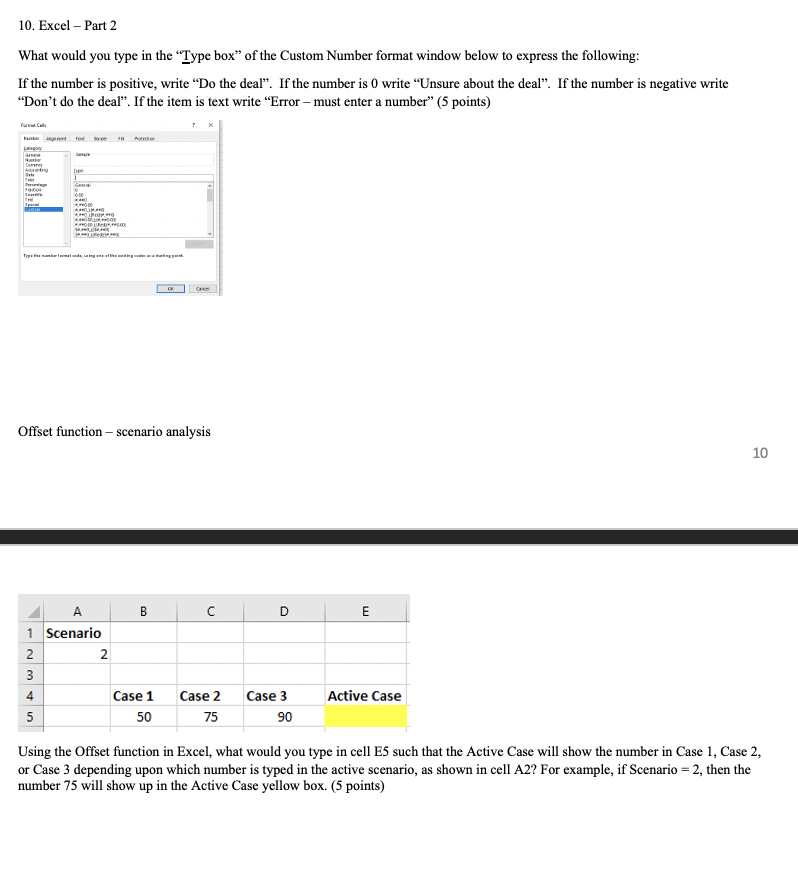
10. Excel - Part 2 What would you type in the Type box of the Custom Number format window below to express the following: If the number is positive, write Do the deal. If the number is 0 write Unsure about the deal. If the number is negative write "Don't do the deal. If the item is text write "Error must enter a number" (5 points) pe be Cum tre . . all ple Offset function - scenario analysis 10 D E w N A B 1 Scenario 2 2 3 4 Case 1 5 50 Active Case Case 2 75 Case 3 90 Using the Offset function in Excel, what would you type in cell Es such that the Active Case will show the number in Case 1, Case 2, or Case 3 depending upon which number is typed in the active scenario, as shown in cell A2? For example, if Scenario = 2, then the number 75 will show up in the Active Case yellow box. (5 points) 10. Excel - Part 2 What would you type in the Type box of the Custom Number format window below to express the following: If the number is positive, write Do the deal. If the number is 0 write Unsure about the deal. If the number is negative write "Don't do the deal. If the item is text write "Error must enter a number" (5 points) pe be Cum tre . . all ple Offset function - scenario analysis 10 D E w N A B 1 Scenario 2 2 3 4 Case 1 5 50 Active Case Case 2 75 Case 3 90 Using the Offset function in Excel, what would you type in cell Es such that the Active Case will show the number in Case 1, Case 2, or Case 3 depending upon which number is typed in the active scenario, as shown in cell A2? For example, if Scenario = 2, then the number 75 will show up in the Active Case yellow box. (5 points)
Step by Step Solution
There are 3 Steps involved in it

Get step-by-step solutions from verified subject matter experts
 Study Help