







Question: 11 On the Report worksheet, create calculations that will help hotel employees manage the fitness class enrollments. The user will put an x in range

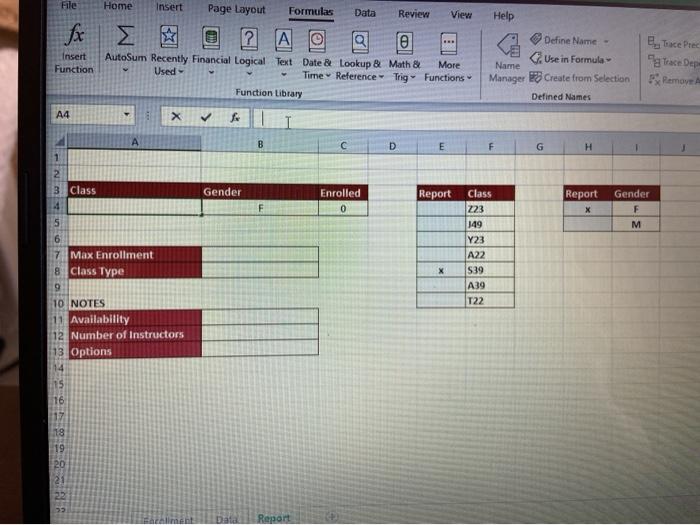
11 On the Report worksheet, create calculations that will help hotel employees manage the fitness class enrollments. The user will put an "x" in range E4:E10, indicating which class to report on and an "Xin range H4 H5 if employees want a report on a specific gender. In cell A4, use a MATCH function nested in an INDEX function to retrieve the Class that was selected in E4:E10. The MATCH should find the row where the "x" is located and would be used within the INDEX to pull the associated Class value from the same row within range F4:F10. File Home Insert Page Layout Formulas Data Review View Help Insert Function 2 a AutoSum Recently Financial Logical Text Date & Lookup & Math & More Used Time Reference - Trig Functions Function Library Define Name - Use in Formula Name Manager Create from Selection Defined Names E Tace Prec grace Dep Pemove A4 X A B D E F G H IN 3 Class Gender Enrolled 0 Report Report Gender E 5 Class 223 149 Y23 A22 M x $39 7 Max Enrollment 8 Class Type 9 10 NOTES 11 Availability 12 Number of Instructors 13 Options A39 T22 15 16 18 20 2 Data Report
Step by Step Solution
There are 3 Steps involved in it

Get step-by-step solutions from verified subject matter experts
 Study Help