







Question: 18. Which process would you use to set a milestone in Project? a) Insert a milestone, and link it to the task that shows
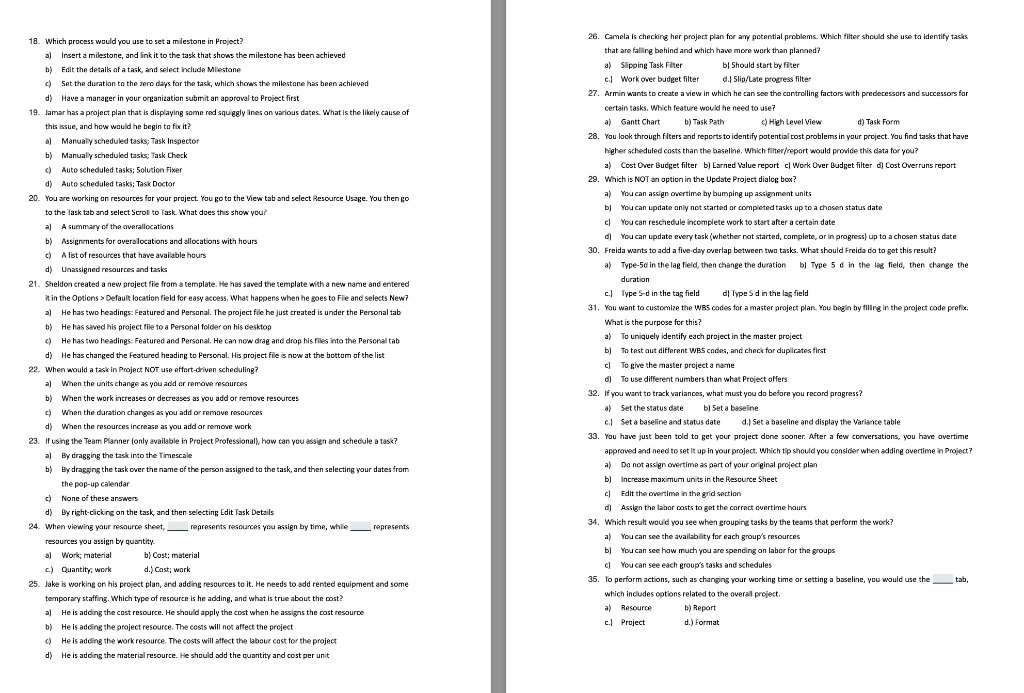
18. Which process would you use to set a milestone in Project? a) Insert a milestone, and link it to the task that shows the milestone has been achieved b) Edit the details of a task, and select include Milestone c) Set the duration to the zero days for the task, which shows the milestone has been achieved d) Have a manager in your organization submit an approval to Project first 19. Jamar has a project plan that is displaying some red squiggly lines on various dates. What is the likely cause of this issue, and how would he begin to fix it? a) Manually scheduled tasks; Task Inspector b) Manually scheduled tasks; Task Check c) Auto scheduled tasks; Solution Fixer d) Auto scheduled tasks; Task Doctor 20. You are working on resources for your project. You go to the View tab and select Resource Usage. You then go to the lask tab and select Scroll to Task. What does this show you? a) A summary of the overallocations b) Assignments for overallocations and allocations with hours c) A list of resources that have available hours d) Unassigned resources and tasks 21. Sheldon created a new project file from a template. He has saved the template with a new name and entered it in the Options > Default location field for easy access. What happens when he goes to File and selects New? a) He has two headings: Featured and Personal. The project file he just created is under the Personal tab b) He has saved his project file to a Personal folder on his desktop c) He has two headings: Featured and Personal. He can now drag and drop his files into the Personal tab d) He has changed the Featured heading to Personal. His project file is now at the bottom of the list 22. When would a task in Project NOT use effort-driven scheduling? a) When the units change as you add or remove resources b) When the work increases or decreases as you add or remove resources c) When the duration changes as you add or remove resources d) When the resources increase as you add or remove work 23. If using the Team Planner (only available in Project Professional), how can you assign and schedule a task? a) By dragging the task into the Timescale b) By dragging the task over the name of the person assigned to the task, and then selecting your dates from the pop-up calendar c) None of these answers d) By right-clicking on the task, and then selecting Edit Task Details 24. When viewing your resource sheet, represents resources you assign by time, while, represents resources you assign by quantity. a) Work; material c) Quantity, work b) Cost; material d.) Cast; work 25. Jake is working on his project plan, and adding resources to it. He needs to add rented equipment and some temporary staffing. Which type of resource is he adding, and what is true about the cost? a) He is adding the cost resource. He should apply the cost when he assigns the cost resource b) He is adding the project resource. The costs will not affect the project c) He is adding the work resource. The costs will affect the labour cost for the project d) He is adding the material resource. He should add the quantity and cost per unit 26. Camela is checking her project plan for any potential problems. Which filter should she use to identify tasks that are falling behind and which have more work than planned? a) Slipping Task Filter bl Should start by filter c.) Work over budget filter d.) Slip/Late progress filter 27. Armin wants to create a view in which he can see the controlling factors with predecessors and successors for certain tasks. Which feature would he need to use? a) Gantt Chart b) Task Path c) High Level View d) Task Form 28. You look through filters and reports to identify potential cost problems in your project. You find tasks that have higher scheduled costs than the baseline. Which filter/report would provide this data for you? a) Cost Over Budget filter b) Earned Value report c) Work Over Budget filter d) Cost Overruns report 29. Which is NOT an option in the Update Project dialog box? a) You can assign overtime by bumping up assignment units b) You can update only not started or completed tasks up to a chosen status date c) You can reschedule incomplete work to start after a certain date d) You can update every task (whether not started, complete, or in progress) up to a chosen status date 30. Freida wants to add a five-day overlap between two tasks. What should Freida do to get this result? a) Type-5d in the lag field, then change the duration b) Type 5 d in the lag field, then change the duration c.) Type 5-d in the tag field d) Type 5 d in the lag field 31. You want to customize the WBS codes for a master project plan. You begin by filling in the project code prefix. What is the purpose for this? a) To uniquely identify each project in the master project b) To test out different WBS codes, and check for duplicates first c) To give the master project a name d) To use different numbers than what Project offers 32. If you want to track variances, what must you do before you record progress? a) Set the status date b) Set a baseline c.) Set a baseline and status date d.) Set a baseline and display the Variance table 33. You have just been told to get your project done sooner. After a few conversations, you have overtime approved and need to set it up in your project. Which tip should you consider when adding overtime in Project? a) Do not assign overtime as part of your original project plan b) Increase maximum units in the Resource Sheet c) Edit the overtime in the grid section d) Assign the labor costs to get the correct overtime hours 34. Which result would you see when grouping tasks by the teams that perform the work? a) You can see the availability for each group's resources b) You can see how much you are spending on labor for the groups c) You can see each group's tasks and schedules 35. To perform actions, such as changing your working time or setting a baseline, you would use the which includes options related to the overall project. a) Resource b) Report c.) Project d.) Format tab,
Step by Step Solution
There are 3 Steps involved in it

Get step-by-step solutions from verified subject matter experts
 Study Help