







Question: 2. Click on the Customer Relations worksheet. a. Sort data based on Order date by newest to oldest. 3. Click on the IF & Nested
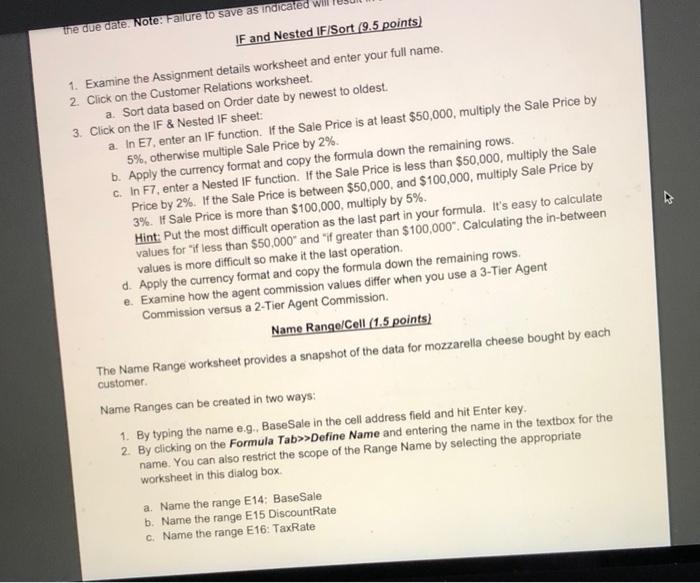
2. Click on the Customer Relations worksheet. a. Sort data based on Order date by newest to oldest. 3. Click on the IF \& Nested IF sheet: b. Apply the currency format and copy the formula down the remaining rows. 5%, othenwise multiple Sale Price by 2% Price by 2%. If the Sale Price is between $50,000, and $1 values for "if less than $50.000 and "if g reate d. Apply the currency format and copy the formi e. Examine how the agent commission values Commission versus a 2-Tier Agent Commi The Name Range worksheet provides a snapshot of the data for mozzarella cheese bought by each customer. Name Ranges can be created in two ways: 1. By typing the name e.9., BaseSale in the cell address field and hit Enter key. 2. By clicking on the Formula Tab>> > Define Name and entering the name in the textbox for the name. You can also restrict the scope of the Range Name by selecting the appropriate worksheet in this dialog box. a. Name the range E14: BaseSale b. Name the range E15 DiscountRate c. Name the range E16: TaxRate 2. Click on the Customer Relations worksheet. a. Sort data based on Order date by newest to oldest. 3. Click on the IF \& Nested IF sheet: b. Apply the currency format and copy the formula down the remaining rows. 5%, othenwise multiple Sale Price by 2% Price by 2%. If the Sale Price is between $50,000, and $1 values for "if less than $50.000 and "if g reate d. Apply the currency format and copy the formi e. Examine how the agent commission values Commission versus a 2-Tier Agent Commi The Name Range worksheet provides a snapshot of the data for mozzarella cheese bought by each customer. Name Ranges can be created in two ways: 1. By typing the name e.9., BaseSale in the cell address field and hit Enter key. 2. By clicking on the Formula Tab>> > Define Name and entering the name in the textbox for the name. You can also restrict the scope of the Range Name by selecting the appropriate worksheet in this dialog box. a. Name the range E14: BaseSale b. Name the range E15 DiscountRate c. Name the range E16: TaxRate
Step by Step Solution
There are 3 Steps involved in it

Get step-by-step solutions from verified subject matter experts
 Study Help