







Question: 2. Create another VLOOKUP function to fill in the phone number for Mark Dumont automatically in Cell G3. 3. Create any logical function by using
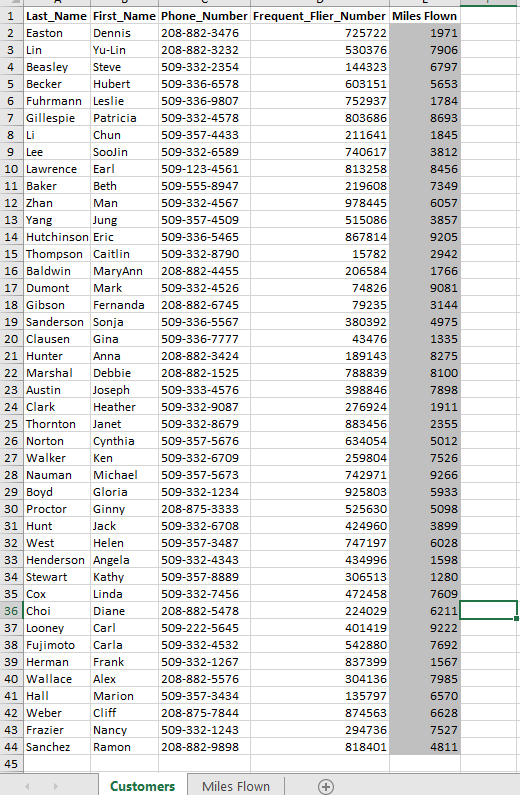
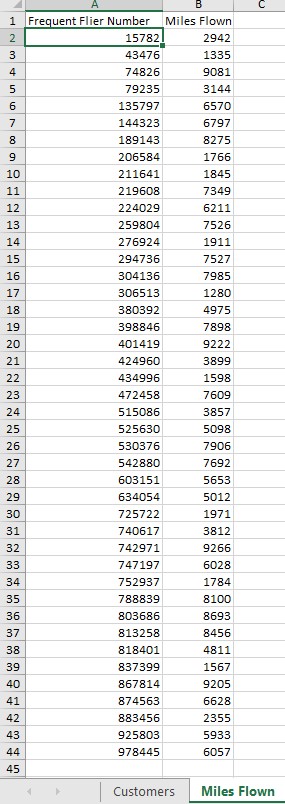
2. Create another VLOOKUP function to fill in the phone number for Mark Dumont automatically in Cell G3.
3. Create any logical function by using one of the following logical operators: AND, OR, NOT. Highlight the data in standard yellow color where this logical function is used on the spreadsheet.
4. Create any IF function that uses a simple named range in calculation based on the example we covered in class. Please highlight the data in standard blue color on the spreadsheet that uses this IF function.
5. Use conditional formatting to highlight top 10 highest-earning frequent fliers with an orange color.
Step by Step Solution
There are 3 Steps involved in it
1 Expert Approved Answer
Step: 1 Unlock

Question Has Been Solved by an Expert!
Get step-by-step solutions from verified subject matter experts
Step: 2 Unlock
Step: 3 Unlock
 Study Help