







Question: 2) Use cell references to enter all input values necessary for the valuation analysis. 3) Add spin button (see below for an example) in the
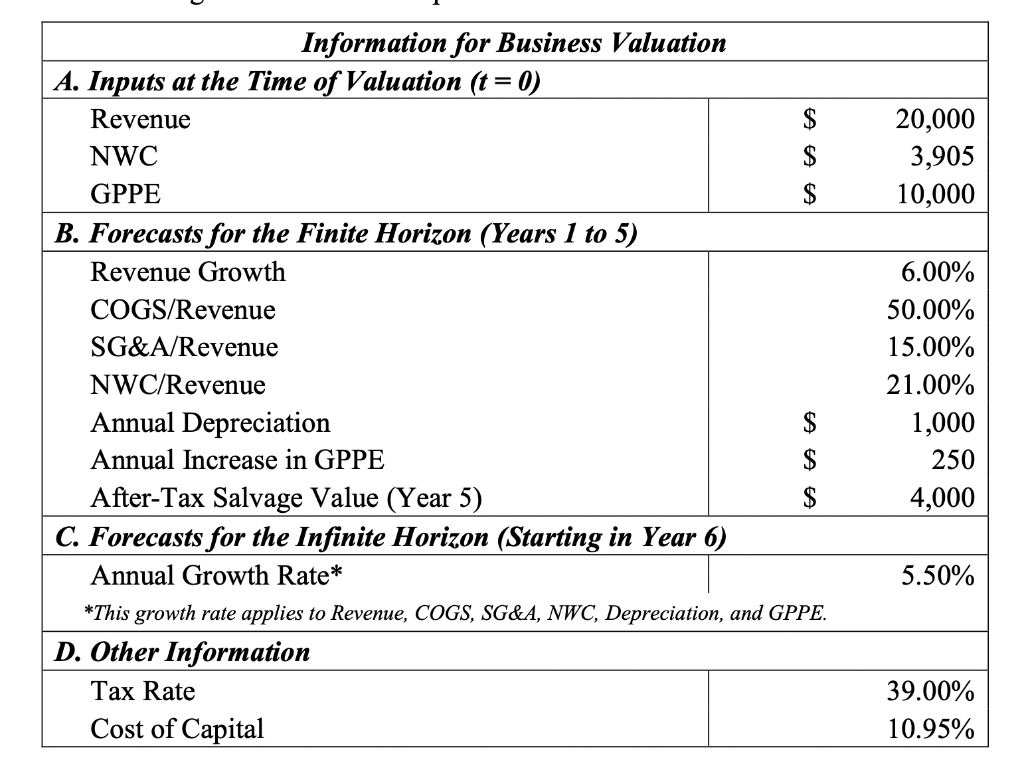
2) Use cell references to enter all input values necessary for the valuation analysis.
3) Add spin button (see below for an example) in the input value for Revenue (t = 0) with an incremental change of $1,000 to make the input interactive.
Example of Spin Button:
4) Use the Excel formula to complete all necessary calculations in the valuation table. Your estimate of the business value should appear in the cell highlighted in yellow. Note that your calculations should change when the input value for Revenue is altered.
5) Present your calculations in the analysis report as follow
Step by Step Solution
There are 3 Steps involved in it
1 Expert Approved Answer
Step: 1 Unlock

Question Has Been Solved by an Expert!
Get step-by-step solutions from verified subject matter experts
Step: 2 Unlock
Step: 3 Unlock
 Study Help