







Question: 2) Use the MATLAB function fsolve (Links to an external site.) to solve the 2-dimensional root problem y2 = - x2 + 34 y =
2) Use the MATLAB function fsolve (Links to an external site.) to solve the 2-dimensional root problem
y2 = - x2 + 34
y = x2 - 6
The steps for this are: Develop a "zeros" function for the two equations as shown in the example problem for fsolve. Note that you will have to use a single vector to pass x and y, that is, rename these as x = [x1, x2]
Use an initial guess of x0 = [2, 2]
Call fsolve with a handle to the function you created and the initial guess. Note that you can (fairly easily) get an idea where the true roots are by graphing the functions
not sure what I'm doing wrong.. my function looks like this:
function F = root2d(x,y)
F(1) = (34 - x.^2 - y.^2);
F(2) = (x.^2 - 6 - y);
And this is what I am trying/error I'm getting:
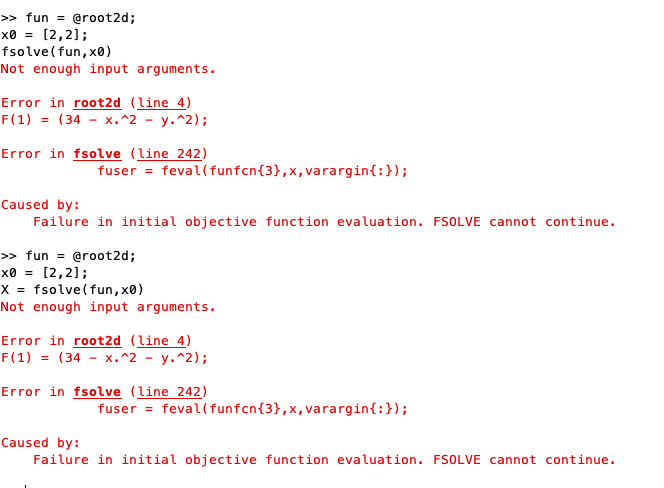
>fun -@root2d; x8 = [2,2]; fsolve(fun, x0) Not enough input arguments. Error in root2d (Line 4) F(1) (34 - X.^2-y.^2 ) ; Error in fsolve (Line 242) fuser feval(funfcn3,x, vararginf:) Caused by: Failure in initial objective function evaluation. FSOLVE cannot continue. >> fun = @root2d; x0 [2,2] ; xfsolve (fun, x0) Not enough input arguments. Error in root2d (Line 4) F(1) = (34 - x.^2 - y.^2 ) ; Error in fsolve (Line 242) fuser feval(funfcn(3),x,varargin{:}); Caused by: Failure in initial objective function evaluation. FSOLVE cannot continue
Step by Step Solution
There are 3 Steps involved in it

Get step-by-step solutions from verified subject matter experts
 Study Help