







Question: 2.1 Define Project Scope Complete Action O At the top of the Scenario Tree, select wpl and rename it to the name of your project.
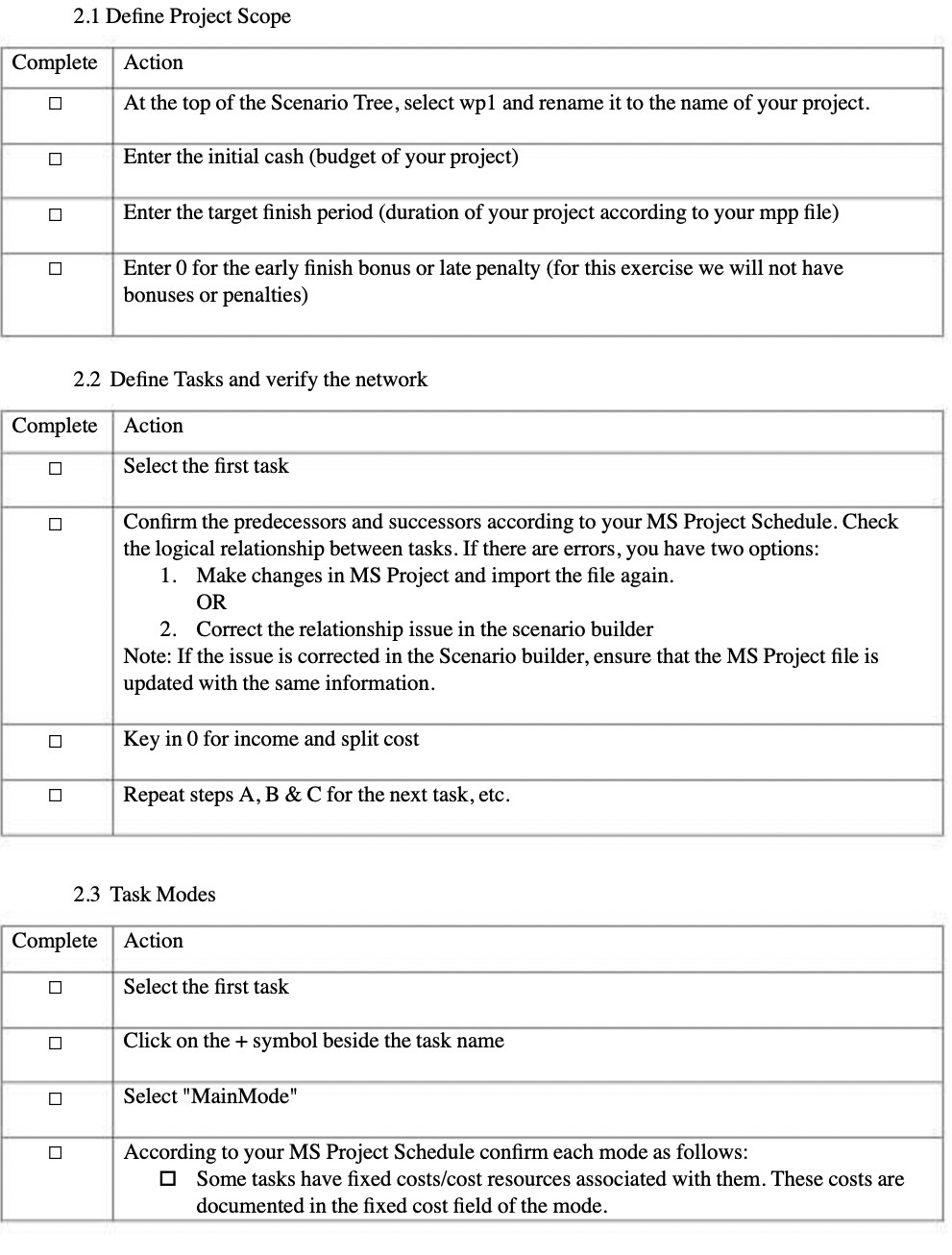
2.1 Define Project Scope Complete Action O At the top of the Scenario Tree, select wpl and rename it to the name of your project. 0 Enter the initial cash (budget of your project) O Enter the target finish period (duration of your project according to your mpp file) Enter 0 for the early finish bonus or late penalty (for this exercise we will not have bonuses or penalties) 2.2 Define Tasks and verify the network Complete Action Select the first task 0 Confirm the predecessors and successors according to your MS Project Schedule. Check the logical relationship between tasks. If there are errors, you have two options: 1. Make changes in MS Project and import the file again. OR 2. Correct the relationship issue in the scenario builder Note: If the issue is corrected in the Scenario builder, ensure that the MS Project file is updated with the same information. O Key in 0 for income and split cost Repeat steps A, B & C for the next task, etc. 2.3 Task Modes Complete Action O Select the first task O Click on the + symbol beside the task name O Select "MainMode" O According to your MS Project Schedule confirm each mode as follows: Some tasks have fixed costs/cost resources associated with them. These costs are documented in the fixed cost field of the mode
Step by Step Solution
There are 3 Steps involved in it

Get step-by-step solutions from verified subject matter experts
 Study Help