







Question: 3. Check Function.m a. Create a new function called Check_Function in a script file Check_Function.m b. Setup a return argument called OutValid and an input
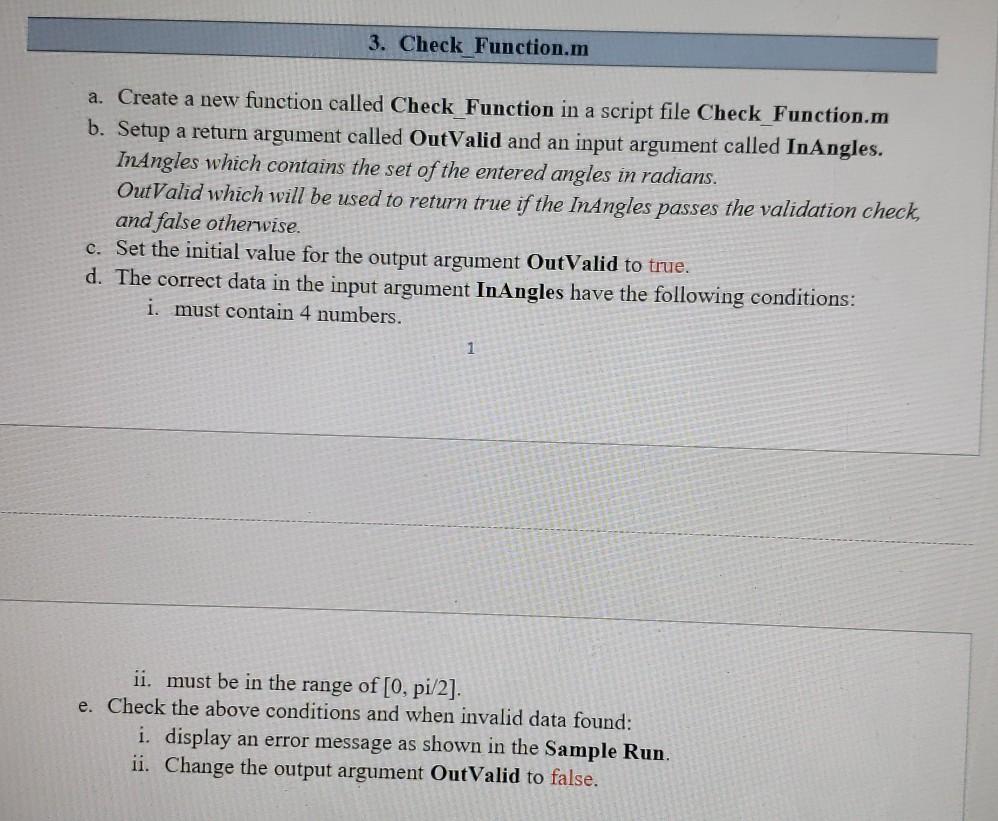
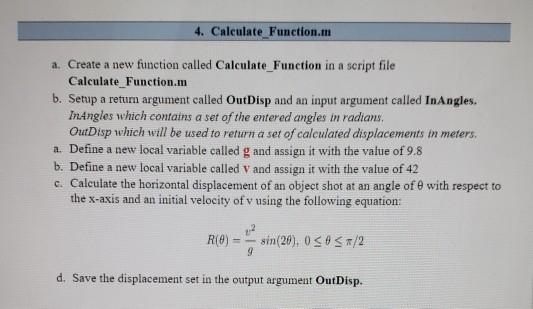
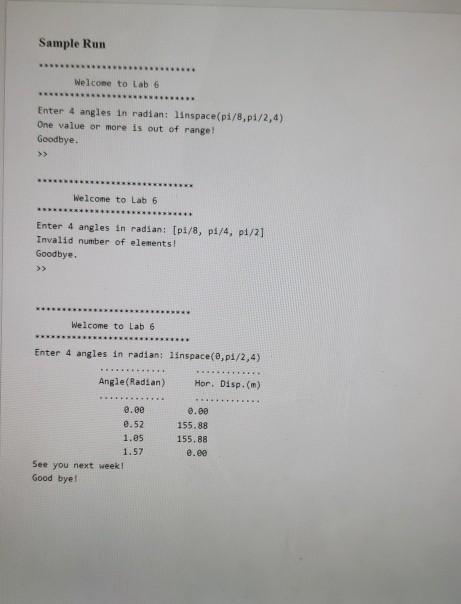
3. Check Function.m a. Create a new function called Check_Function in a script file Check_Function.m b. Setup a return argument called OutValid and an input argument called InAngles. InAngles which contains the set of the entered angles in radians. OutValid which will be used to return true if the InAngles passes the validation check and false otherwise. c. Set the initial value for the output argument OutValid to true. d. The correct data in the input argument InAngles have the following conditions: i. must contain 4 numbers. 1 ii. must be in the range of [0, pi/2). e. Check the above conditions and when invalid data found: i. display an error message as shown in the Sample Run. ii. Change the output argument OutValid to false. 4. Calculate Function.m a. Create a new function called Calculate_Function in a seript file Calculate_Function.m b. Setup a retum argument called OutDisp and an input argument called InAngles. Inangles which contains a set of the entered angles in radians. OutDisp which will be used to return a set of calculated displacements in meters, a. Define a new local variable called g and assign it with the value of 9.8 b. Define a new local variable called V and assign it with the value of 42 c. Calculate the horizontal displacement of an object shot at an angle ofe with respect to the x-axis and an initial velocity of v using the following equation: R(O) sin(20), 038 5/2 9 d. Save the displacement set in the output argument OutDisp. Sample Run Welcome to Lab 6 Enter 4 angles in radian: linspace(pi/8.1/2,4) One value or more is out of range! Goodbye. Welcome to Lab 6 Enter 4 angles in radian: (pi/8, pf/4, p1/2] Invalid number of elements! Goodbye. Welcome to Lab 6 ***** Enter 4 angles in radian: linspace(0, 08/2,4) Angle(Radian) Hor. Disp.(m) 8.00 0.52 1.es 1.57 See you next week! Good bye! 8.00 155.88 155.88 e.ee 3. Check Function.m a. Create a new function called Check_Function in a script file Check_Function.m b. Setup a return argument called OutValid and an input argument called InAngles. InAngles which contains the set of the entered angles in radians. OutValid which will be used to return true if the InAngles passes the validation check and false otherwise. c. Set the initial value for the output argument OutValid to true. d. The correct data in the input argument InAngles have the following conditions: i. must contain 4 numbers. 1 ii. must be in the range of [0, pi/2). e. Check the above conditions and when invalid data found: i. display an error message as shown in the Sample Run. ii. Change the output argument OutValid to false. 4. Calculate Function.m a. Create a new function called Calculate_Function in a seript file Calculate_Function.m b. Setup a retum argument called OutDisp and an input argument called InAngles. Inangles which contains a set of the entered angles in radians. OutDisp which will be used to return a set of calculated displacements in meters, a. Define a new local variable called g and assign it with the value of 9.8 b. Define a new local variable called V and assign it with the value of 42 c. Calculate the horizontal displacement of an object shot at an angle ofe with respect to the x-axis and an initial velocity of v using the following equation: R(O) sin(20), 038 5/2 9 d. Save the displacement set in the output argument OutDisp. Sample Run Welcome to Lab 6 Enter 4 angles in radian: linspace(pi/8.1/2,4) One value or more is out of range! Goodbye. Welcome to Lab 6 Enter 4 angles in radian: (pi/8, pf/4, p1/2] Invalid number of elements! Goodbye. Welcome to Lab 6 ***** Enter 4 angles in radian: linspace(0, 08/2,4) Angle(Radian) Hor. Disp.(m) 8.00 0.52 1.es 1.57 See you next week! Good bye! 8.00 155.88 155.88 e.ee
Step by Step Solution
There are 3 Steps involved in it

Get step-by-step solutions from verified subject matter experts
 Study Help