







Question: 4. You are required to use Microsoft Excel to create a Gantt chart to plan your training. Learner Guideline: You can refer to an example
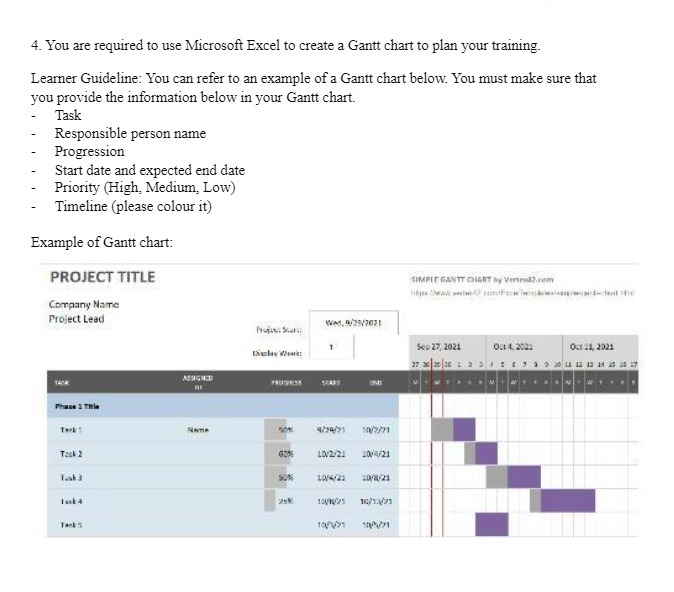
4. You are required to use Microsoft Excel to create a Gantt chart to plan your training. Learner Guideline: You can refer to an example of a Gantt chart below. You must make sure that you provide the information below in your Gantt chart. Task Responsible person name Progression Start date and expected end date Priority (High, Medium, Low) Timeline (please colour it) Example of Gantt chart: PROJECT TITLE SIMPLE GANTT CHART by Veneold.com Company Name Project Lead WAN. 9125/3021 Sep 27, 2021 05 21, 2021 ASHGHT 474/21 Teck 2 LOVE/21 1014/21 10321
Step by Step Solution
There are 3 Steps involved in it
1 Expert Approved Answer
Step: 1 Unlock

Question Has Been Solved by an Expert!
Get step-by-step solutions from verified subject matter experts
Step: 2 Unlock
Step: 3 Unlock
 Study Help