







Question: 5. Do this in a spreadsheet: Pick an age to begin regular contributions to a retirement account. Pick an age to stop working. Using the
5. Do this in a spreadsheet: Pick an age to begin regular contributions to a retirement account. Pick an age to stop working. Using the retirement account contribution you selected in #3: Age to beging regular contributions is 25, stop working at 65, money initaly in the account is $21,780.60.
a) Calculate your account balance after the last contribution is made. Assume a real return of 3%.
b) Replace the 3% with 6 sets of returns taken from the return history spreadsheet that accompanies this assignment on Canvas. For example, you might use 1980 to 2015 or 1975 to 2010. Of course you will need to select a range of years that matches the number of years in your working career. Working 40 years and using 30 years of returns wont work. The return history spreadsheet provides real returns for 100% stock and 50% stock/50% bonds. Use three of each.
I will only be able to see results for your last set of returns b/c you will have erased the previous results when you paste a new set of returns. Create a table somewhere on your spreadsheet with the years used and your ending balances.
Do a search on --- the 4% rule in finance ---. You will discover that the standard recommendation is that you withdraw 4% of your account balance the first year of retirement and then withdraw this same dollar amount (increased for inflation) every year until death. Since the average REAL stock market return is 8%, you should be surprised that the safe withdrawal rate is 4%. This is due to timing risk. In fact, most simulations show a 10% chance of running out of money when following the 10% rule.
6. Do this in a spreadsheet: Test the 4% rule. Begin with $1,000,000 in an account. Try withdrawing $40,000 a year for 30 years and see if you run out of money. Use six sets of 30-year return sequences like you did in the previous question. How many times did you run out of money? I had a student in an honors class a few years ago who wrote a Visual Basic macro to try all possible 30-year sequences from the spreadsheet. Anyone who is feeling energetic can try this.
I will only be able to see results for your last set of returns b/c you will have erased the previous results when you paste a new set of returns. Create a table somewhere on your spreadsheet with the years used and your ending balances.
Sets of year return sequences
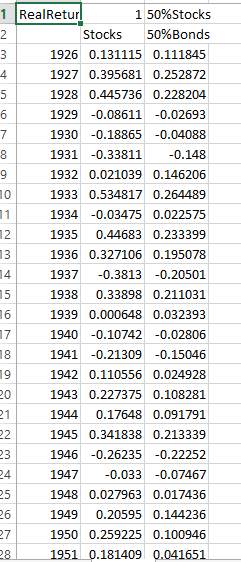
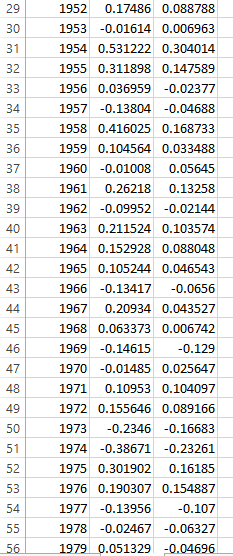
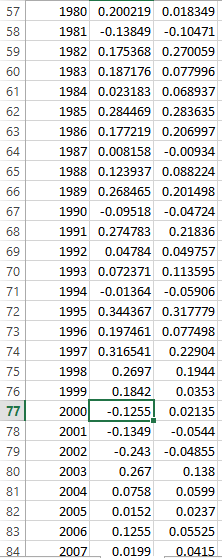
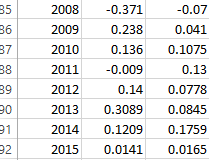
1 RealRetur 1 50%Stocks Stocks 50%Bonds 1926 0.131115 0.111845 1927 0.395681 0.252872 1928 0.445736 0.228204 6 1929 -0.08611 -0.02693 7 1930 -0.18865 -0.04088 8 1931 -0.33811 0.148 9 1932 0.021039 0.146206 1933 0.534817 0.264489 1934 -0.03475 0.022575 1935 0.44683 0.233399 1936 0.327106 0.195078 4 1937 -0.3813 -0.20501 15 1938 0.33898 0.211031 1939 0.000648 0.032393 17 1940 -0.10742 -0.02806 1941 -0.21309 -0.15046 1942 0.110556 0.024928 20 1943 0.227375 0.108281 21 1944 0.17648 0.091791 22 1945 0.341838 0.213339 23 1946 -0.26235 -0.22252 24 1947 -0.033 -0.07467 25 1948 0.027963 0.017436 26 1949 0.20595 0.144236 27 1950 0.259225 0.100946 28 1951 0.181409 0 1 RealRetur 1 50%Stocks Stocks 50%Bonds 1926 0.131115 0.111845 1927 0.395681 0.252872 1928 0.445736 0.228204 6 1929 -0.08611 -0.02693 7 1930 -0.18865 -0.04088 8 1931 -0.33811 0.148 9 1932 0.021039 0.146206 1933 0.534817 0.264489 1934 -0.03475 0.022575 1935 0.44683 0.233399 1936 0.327106 0.195078 4 1937 -0.3813 -0.20501 15 1938 0.33898 0.211031 1939 0.000648 0.032393 17 1940 -0.10742 -0.02806 1941 -0.21309 -0.15046 1942 0.110556 0.024928 20 1943 0.227375 0.108281 21 1944 0.17648 0.091791 22 1945 0.341838 0.213339 23 1946 -0.26235 -0.22252 24 1947 -0.033 -0.07467 25 1948 0.027963 0.017436 26 1949 0.20595 0.144236 27 1950 0.259225 0.100946 28 1951 0.181409 0
Step by Step Solution
There are 3 Steps involved in it

Get step-by-step solutions from verified subject matter experts
 Study Help