







Question: 5-3 in the following javascript code follow the directions listed below and add on to the code provided Hands-on Project 5-2 Hands-on Project 5-2 Change
5-3 in the following javascript code follow the directions listed below and add on to the code provided
Hands-on Project 5-2
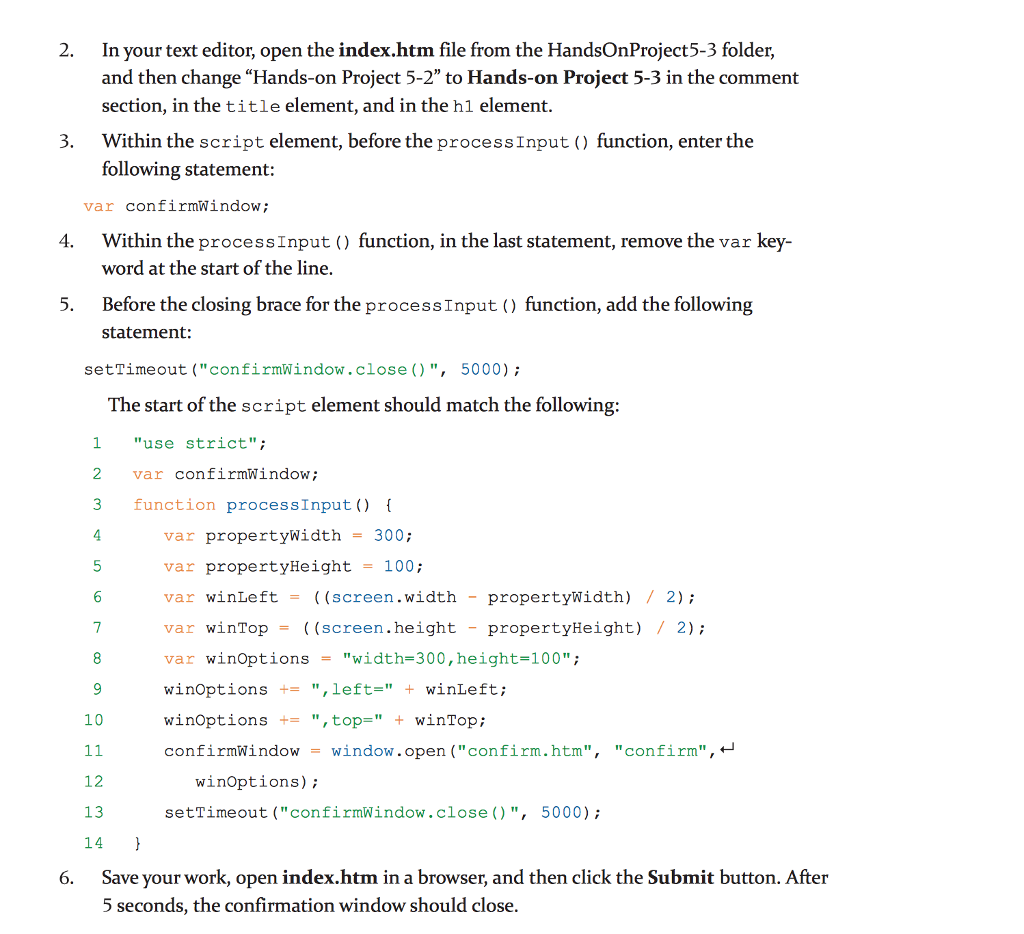
2. In your text editor, open the index.htm file from the HandsOnProject5-3 folder, and then change "Hands-on Project 5-2" to Hands-on Project 5-3 in the comment section, in the title element, and in the hl element. 3. Within the script element, before the processInput ) function, enter the following statement var confirmWindow; Within the processInput () function, in the last statement, remove the var key word at the start of the line, 4. 5. Before the closing brace for the processInput function, add the following statement: setTimeout ("confirmWindow.close()", 5000) The start of the script element should match the following 1 "use strict"; 2 var confirmWindow; 3 function processInput) 4 var propert ywidth = 300; var propertyHeight = 100; var winLeft = ((screen.width - propertyWidth) / 2); var winTop= ((screen . height-propertyHeight) / 2); var win0ptions = "width-300,height-100"; winOptions +",left-"+winLeft; winOptions-",top=" + winTop; confirmWindow= window.open ( "confirm . htm", "confirm'' , 10 12 winOptions); 13 setTimeout ("confirmWindow.close()", 5000) Save your work, open index.htm in a browser, and then click the Submit button. After 5 seconds, the confirmation window should close 6
Step by Step Solution
There are 3 Steps involved in it
1 Expert Approved Answer
Step: 1 Unlock

To follow the instructions from the project here is how you should update your indexhtm file Update ... View full answer
Question Has Been Solved by an Expert!
Get step-by-step solutions from verified subject matter experts
Step: 2 Unlock
Step: 3 Unlock
 Study Help